Tuesday, March 21, 2023

Oracle Transparent Application Continuity (TAC) - Part 1 (TAF)

 I was asked a question a few days ago whether DMLs will be failed over to surviving instance if one of the instance in a Oracle RAC is crashed. 

I took sometime to get a proper answer to this question as I was not sure how DMLs were handled in RAC. All I know until that time was "Select" queries will be failed over to another instance. This mechanism is called Transparent Application Failover or TAF which is in Oracle from a long time since Oracle Parallel Server (OPS) introduced in Oracle 8i. 

Transparent Application Failover

When an instance fails, TAF creates a new session on the surviving node or when the SELECT mode is configured, the sessions are replayed on the surviving node. For example, let us assume we are querying a table with a million records and when the query is in midway and node fails, the session will be created on the other surviving node to the state where the query is started and the SELECT is replayed in the other node to provide output to the end user/application. This new session creation on the other node is transparent to the end user/application.

FAN and ONS

Fast Application Notification (FAN) is a critical component in all of the High Availability solutions where continuous service and continuous connections built into RAC are extended to applications and application servers. When a state of database service changes such as down or unresponsive, the new status is posted to interested subscribers via FAN events. More on FAN can be found here

Oracle Notification Services (ONS) is installed as part of installation of Oracle Grid Infrastructure or Oracle dataguard installation. ONS is responsible for propagating FAN events to all other ONS daemons it is registered with. There is one ONS daemon started per cluster node. ONS facilitates FAN and also the load balancing feature of Oracle RAC for workload management. 

Session Failover without TAF

Let's see an example of a session's behavior when we connect via the default service. This service is basic service created to connect to the database. 

My TNS entry is as below

orabliss =
    (DESCRIPTION =
        (ADDRESS = (PROTOCOL = TCP)(HOST = ol819-scan)(PORT = 1521))
        (CONNECT_DATA =
            (SERVER = DEDICATED)
            (SERVICE_NAME = orabliss.selvapc.com)
        )
    )
I have created a table TEST_TABLE under DUMMY user in the database so I'll perform the full table select and simulate the crash by turning off the node where the session is connected. 

The select statement takes ~ 50 seconds to complete and I will be terminating the node while the query is running. 

Session details: 


You can see I have connected to INST_ID 2 (ol819-rac2) from Machine ol819-rac1

First normal query execution:
SQL> select * from test_table;

=== Suppressed query output ===

440,813 rows selected.

Elapsed: 00:00:50.744
 
Now I'll be introducing a crash by turning off node 2 after firing the select query again and monitor the existing session from node 1:
...
...
...
OWNER
--------------------------------------------------------------------------------------------------------------------------------
OBJECT_NAME
--------------------------------------------------------------------------------------------------------------------------------
SUBOBJECT_NAME                                                                                                                    OBJECT_ID DATA_OBJECT_ID OBJECT_TYPE             CREATED   LAST_DDL_
-------------------------------------------------------------------------------------------------------------------------------- ---------- -------------- ----------------------- --------- ---------
TIMESTAMP           STATUS  T G S  NAMESPACE EDITION_NAME                                                                                                                     SHARING            E O A
------------------- ------- - - - ---------- -------------------------------------------------------------------------------------------------------------------------------- ------------------ - - -
DEFAULT_COLLATION                                                                                    D S CREATED_APPID CREATED_VSNID MODIFIED_APPID MODIFIED_VSNID
---------------------------------------------------------------------------------------------------- - - ------------- ------------- -------------- --------------
2019-04-17:01:42:19 VALID   N N N          1                                                                                                                                  METADATA LINK        Y N
                                                                                                     N N

ERROR:
ORA-03135: connection lost contact
Process ID: 55738
Session ID: 599 Serial number: 54452


29370 rows selected.

SQL>
Now, once the node is down the session running the select query encountered an error ORA-03135. Note the query fetched only ~29k  records of total  ~ 440k records before failure. 

Configuring TAF

TAF is configured by creating a service on RAC and assigning failover parameters as shown below. Do not use the default service that is created while creating a container database or PDB as this service will be running on all the instances and running always on a RAC system. You should not alter or modify this service. This default service cannot be disabled, relocated or restricted so it doesn't provide high availability. Instead create a specific service with unique identifier to connect to the intended database with the intended properties. 

From version 11.2 onwards we can create services using srvctl command. 

srvctl add service -db cdbrac -pdb orabliss -service orabliss_taf -tafpolicy BASIC -failovertype SELECT -clbgoal LONG -preferred cdbrac1,cdbrac2

[oracle@ol819-rac1 ~]$ srvctl add service -db cdbrac -pdb orabliss -service orabliss_taf -tafpolicy BASIC -failovertype SELECT -clbgoal LONG -preferred cdbrac1,cdbrac2
[oracle@ol819-rac1 ~]$ srvctl start service -db cdbrac -service orabliss_taf
[oracle@ol819-rac1 ~]$ srvctl status service -db cdbrac -service orabliss_taf
Service orabliss_taf is running on instance(s) cdbrac1,cdbrac2
[oracle@ol819-rac1 ~]$

We now see the details of the services from the database as below


-tafpolicy accepts only BASIC from version 11.2 meaning the failover occurs only at the time of failure and there is no pre-connect option available. 

-failovertype of SELECT enables the read on other surviving node once there is a crash on the session's existing node. Other option for TAF is SESSION where upon node failure the session is connected on the surviving instance but does not continue the SELECT.

Now, my TNS entry is as below using the newly created service

orabliss_taf =
    (DESCRIPTION =
        (ADDRESS = (PROTOCOL = TCP)(HOST = ol819-scan)(PORT = 1521))
        (CONNECT_DATA =
            (SERVER = DEDICATED)
            (SERVICE_NAME = orabliss_taf.selvapc.com)
        )
    )
I'm connecting to the DB using the orabliss_taf service and simulate the crash as before. 
SQL> select program,sid,failover_type,failover_method,failed_over from v$session where sid=sys_context('userenv', 'sid');

PROGRAM                                                 SID FAILOVER_TYPE FAILOVER_M FAI
------------------------------------------------ ---------- ------------- ---------- ---
sqlplus@ol819-rac1.selvapc.com (TNS V1-V3)              606 SELECT        BASIC      NO

Elapsed: 00:00:00.00
SQL> select * from test_table;

=== Suppressed query output ===

=== Introduced the crash while query is running midway ===

440813 rows selected.

Elapsed: 00:08:01.75
SQL>
SQL> select program,sid,failover_type,failover_method,failed_over from v$session where sid=sys_context('userenv', 'sid');

PROGRAM                                                 SID FAILOVER_TYPE FAILOVER_M FAI
------------------------------------------------ ---------- ------------- ---------- ---
sqlplus@ol819-rac1.selvapc.com (TNS V1-V3)               26 SELECT        BASIC      YES

Elapsed: 00:00:00.06
SQL>
While the original session was created with SID=606, the session failed over to node 1 and have a new SID=26. We can see the FAILED_OVER column also changed to YES. 
The query also took a significantly longer time of ~ 8 minutes against ~ 50 seconds as the failover happens to the other node and then the select has to start again from the beginning after the instance recovery is completed. So this 8 minute is a combined time of all the failover activities along with the query execution time where the session waits for the instance recovery as well.

We can see the alert log will register the below details indicating the instance recovery due to node 2 crash. This is just to check whether instance recovery is completed properly
Reconfiguration started (old inc 4, new inc 6)
List of instances (total 1) :
 1
Dead instances (total 1) :
 2
My inst 1
publish big name space -  dead or down/up instance detected, invalidate domain 0
 Global Resource Directory frozen
* dead instance detected - domain 0 invalid = TRUE
* dead instance detected - domain 2 invalid = TRUE, need cdb-level instance recovery
* dead instance detected - domain 3 invalid = TRUE, need cdb-level instance recovery
 Communication channels reestablished
 Master broadcasted resource hash value bitmaps
...
...
 Post SMON to start 1st pass IR
2023-03-18T10:11:45.794262+05:30
CDB IR excluding pdb 2 which was cleanly closed.
2023-03-18T10:11:45.794383+05:30
Instance recovery: looking for dead threads
2023-03-18T10:11:45.812848+05:30
Beginning instance recovery of 1 threads
...
...
...
Started redo application at
 Thread 2: logseq 83, block 157204, offset 0
...
...
...
2023-03-18T10:11:46.025646+05:30
Redo thread 2 internally disabled at seq 84 (SMON)
CDB instance recovery complete: pdb 2 valid 1 (flags x10, pdb flags x40080)
CDB instance recovery complete: pdb 3 valid 1 (flags x10, pdb flags x40080)
CDB instance recovery complete: pdb 0 valid 1 (flags x10, pdb flags x80)
...
...
So, the Transparent Appliation Failover (TAF) option is great for applications which reads a lot as they don't have to worry about DB getting down as the services will get the work done transparent to the application. 

Now, what if a batch job runs in the database performing millions of DML and then the node is crashed? This could happen and mostly it's not by software error but sometimes due to patching window where applications are not appraised of the schedule, issues with underlying OS or storage causing DB node to crash, etc,. What would be the condition of the database sessions? Will the DMLs continue to run on the other surviving node? Do we have any automated mechanism to take care of this situation for us? 

Let's see about that in the next post. 

References: 


Happy TAFing...!!!

Monday, January 30, 2023

Oracle CMU - Service Principal Name with multiple servers

 I have written regarding setting up Oracle Centrally Managed Users (CMU) and the various troubleshooting steps in my previous posts. You can take a look at those by clicking below links.

Once we complete the setup, one of the most anticipated questions one will have is how many Service Principal Accounts (oserv - in our lab) do we need to create if we have databases on multiple servers. For example, if we have 10 servers, do we need 1 Service Principal Account (SPN) or 10 SPNs individual to each server. 

I have raised this question to Oracle support on multiple SRs and the answers differ from each SR. One engineer says all we need is 1 SPN and another engineer says we need 10 SPNs if we have 10 servers. This is confusing. So, now we will test it ourselves. I'll be configuring Kerberos Authentication on another server (linux75.selvapc.com) running Oracle database 12.2.0.1 

For this test, we are not going to change any of the steps from the PART A and PART B of the CMU configuration since that will complete the Kerberos authentication. My sqlnet.ora and krb5.conf will not have any changes from the other server. 

[oracle@linux75 admin]$ more sqlnet.ora
# sqlnet.ora Network Configuration File: /u01/db/122/network/admin/sqlnet.ora
# Generated by Oracle configuration tools.

NAMES.DIRECTORY_PATH= (TNSNAMES, EZCONNECT)
#Kerberos Parameters
SQLNET.AUTHENTICATION_SERVICES=(beq,kerberos5)
SQLNET.FALLBACK_AUTHENTICATION=TRUE
SQLNET.AUTHENTICATION_KERBEROS5_SERVICE=oracle
SQLNET.KERBEROS5_CONF=/u01/db/122/network/admin/krb5.conf
SQLNET.KERBEROS5_CLOCKSKEW=6000
SQLNET.KERBEROS5_CONF_MIT=TRUE
#Following parameter is server-side only
SQLNET.KERBEROS5_KEYTAB=/u01/db/122/network/admin/linux75-database.keytab
[oracle@linux75 admin]$
[oracle@linux75 admin]$ more krb5.conf
[libdefaults]
    default_realm = ORABLISS.COM
    clockskew = 6000
    passwd_check_s_address = false
    noaddresses = true
    forwardable = yes
[realms]
    ORABLISS.COM = {
        kdc = 192.168.56.99:88
    }
[domain_realm]
    ORABLISS.COM = ORABLISS.COM
    .ORABLISS.COM = ORABLISS.COM
    orabliss.com = ORABLISS.COM
    .orabliss.com = ORABLISS.COM
[oracle@linux75 admin]$
You can notice, the only difference will be the keytab file specific to my linux75 server. 

The keytab file is generated as below 
Windows PowerShell
Copyright (C) Microsoft Corporation. All rights reserved.

PS C:\Users\Administrator> ktpass -princ oracle/linux75.selvapc.com@ORABLISS.com -pass Qwerty123# -mapuser oserv@orabliss.com -crypto ALL -ptype KRB5_NT_PRINCIPAL -out Z:\linux75-database.keytab
Targeting domain controller: DS2019.orabliss.com
Successfully mapped oracle/linux75.selvapc.com to oserv.
Password successfully set!
Key created.
Key created.
Key created.
Key created.
Key created.
Output keytab to Z:\linux75-database.keytab:
Keytab version: 0x502
keysize 66 oracle/linux75.selvapc.com@ORABLISS.com ptype 1 (KRB5_NT_PRINCIPAL) vno 11 etype 0x1 (DES-CBC-CRC) keylength 8 (0xfb5e5b384c467904)
keysize 66 oracle/linux75.selvapc.com@ORABLISS.com ptype 1 (KRB5_NT_PRINCIPAL) vno 11 etype 0x3 (DES-CBC-MD5) keylength 8 (0xfb5e5b384c467904)
keysize 74 oracle/linux75.selvapc.com@ORABLISS.com ptype 1 (KRB5_NT_PRINCIPAL) vno 11 etype 0x17 (RC4-HMAC) keylength 16 (0xc5c6bc2b1d924244af78c13df85a5eee)
keysize 90 oracle/linux75.selvapc.com@ORABLISS.com ptype 1 (KRB5_NT_PRINCIPAL) vno 11 etype 0x12 (AES256-SHA1) keylength 32 (0xc9e1bf8b841bd336c3ab4fca0c67f0037b21d5719b4c661606a0745cd823e7f7)
keysize 74 oracle/linux75.selvapc.com@ORABLISS.com ptype 1 (KRB5_NT_PRINCIPAL) vno 11 etype 0x11 (AES128-SHA1) keylength 16 (0x4e84b8fae0598b793cd76a09f5658f29)
PS C:\Users\Administrator>
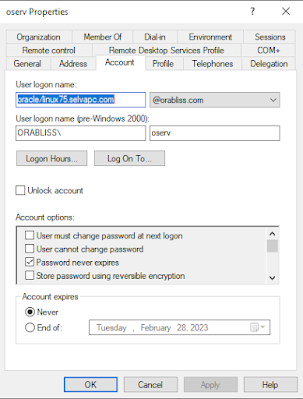
You can now notice in the above command, I'm still using the -mapuser as oserv@orabliss.com which is our SPN. Now the account will look like below.


Notice the User logon name has changed from ORACLE/linux-8.selvapc.com to oracle/linux75.selvapc.com 

Note: Please see the reason for small case usage for "oracle" in the troubleshooting post. 

Now, we are ready for testing. Transfer the keytab file generated to database server linux75.selvapc.com and create the externally authenticated user as usual. Once all is done, we are ready to connect to the database. 
SQL> create user cmuuser identified externally as 'snagulan@ORABLISS.COM';
grant create session to cmuuser;
grant select on v_$database to cmuuser;
User created.

SQL>
Grant succeeded.

SQL>

Grant succeeded.

SQL>
SQL> exit
Disconnected from Oracle Database 12c Enterprise Edition Release 12.2.0.1.0 - 64bit Production
[oracle@linux75 admin]$ okinit snagulan

Kerberos Utilities for Linux: Version 12.2.0.1.0 - Production on 29-JAN-2023 12:53:43

Copyright (c) 1996, 2016 Oracle.  All rights reserved.

Configuration file : /u01/db/122/network/admin/krb5.conf.
Password for snagulan@ORABLISS.COM:
[oracle@linux75 admin]$
[oracle@linux75 admin]$ oklist

Kerberos Utilities for Linux: Version 12.2.0.1.0 - Production on 29-JAN-2023 12:53:50

Copyright (c) 1996, 2016 Oracle.  All rights reserved.

Configuration file : /u01/db/122/network/admin/krb5.conf.
Ticket cache: FILE:/tmp/krb5cc_54321
Default principal: snagulan@ORABLISS.COM

Valid starting     Expires            Service principal
01/29/23 12:53:48  01/29/23 22:53:48  krbtgt/ORABLISS.COM@ORABLISS.COM
        renew until 01/30/23 12:53:44
[oracle@linux75 admin]$ sqlplus /@orclpdb

SQL*Plus: Release 12.2.0.1.0 Production on Sun Jan 29 12:53:58 2023

Copyright (c) 1982, 2016, Oracle.  All rights reserved.


Connected to:
Oracle Database 12c Enterprise Edition Release 12.2.0.1.0 - 64bit Production

SQL> set heading off
select 'DB_NAME (from v$database) : '||name,
       'CONTAINER_NAME            : '||sys_context('USERENV','CON_NAME'),
       'SESSION_USER              : '||sys_context('USERENV','SESSION_USER'),
       'AUTHENTICATED_IDENTITY    : '||sys_context('USERENV','AUTHENTICATED_IDENTITY'),
       'AUTHENTICATION_METHOD     : '||sys_context('USERENV','AUTHENTICATION_METHOD'),
SQL>        'IDENTIFICATION_TYPE       : '||sys_context('USERENV','IDENTIFICATION_TYPE'),
  2    3    4    5    6    7         --'LDAP_SERVER_TYPE          : '||sys_context('USERENV','LDAP_SERVER_TYPE'),
       'ENTERPRISE_IDENTITY       : '||sys_context('USERENV','ENTERPRISE_IDENTITY')
from v$database;  8    9

DB_NAME (from v$database) : ORCL
CONTAINER_NAME            : ORCLPDB
SESSION_USER              : CMUUSER
AUTHENTICATED_IDENTITY    : snagulan@ORABLISS.COM
AUTHENTICATION_METHOD     : KERBEROS
IDENTIFICATION_TYPE       : EXTERNAL
ENTERPRISE_IDENTITY       : snagulan@ORABLISS.COM


SQL> !hostname
linux75.selvapc.com

SQL>
 
Ok, we have successfully tested the kerberos connection from the newly configured database server. What happens to the previously configured database server since we have now change the SPN User Logon name? Does the CMU connection to the server linux-8.selvapc.com still work or does it break after new server configuration? 

Let's test it. 
[oracle@linux-8 ~]$ okinit snagulan

Kerberos Utilities for Linux: Version 19.0.0.0.0 - Production on 29-JAN-2023 23:31:46

Copyright (c) 1996, 2019 Oracle.  All rights reserved.

Configuration file : /oracle/db/db19/network/admin/krb5.conf.
Password for snagulan@ORABLISS.COM:
[oracle@linux-8 ~]$ oklist

Kerberos Utilities for Linux: Version 19.0.0.0.0 - Production on 29-JAN-2023 23:31:53

Copyright (c) 1996, 2019 Oracle.  All rights reserved.

Configuration file : /oracle/db/db19/network/admin/krb5.conf.
Ticket cache: FILE:/tmp/krb5cc_1000
Default principal: snagulan@ORABLISS.COM

Valid starting     Expires            Service principal
01/29/23 23:31:50  01/30/23 09:31:50  krbtgt/ORABLISS.COM@ORABLISS.COM
        renew until 01/30/23 23:31:47
[oracle@linux-8 ~]$ sqlplus /@odb1

SQL*Plus: Release 19.0.0.0.0 - Production on Sun Jan 29 23:32:12 2023
Version 19.10.0.0.0

Copyright (c) 1982, 2019, Oracle.  All rights reserved.

Last Successful login time: Sat Jan 28 2023 23:10:46 +05:30

Connected to:
Oracle Database 19c Enterprise Edition Release 19.0.0.0.0 - Production
Version 19.10.0.0.0

SQL> set heading off
select 'DB_NAME (from v$database) : '||name,
           'CONTAINER_NAME                        : '||sys_context('USERENV','CON_NAME'),
       'SESSION_USER              : '||sys_context('USERENV','SESSION_USER'),
       'AUTHENTICATED_IDENTITY    : '||sys_context('USERENV','AUTHENTICATED_IDENTITY'),
       'AUTHENTICATION_METHOD     : '||sys_context('USERENV','AUTHENTICATION_METHOD'),
       'IDENTIFICATION_TYPE       : '||sys_context('USERENV','IDENTIFICATION_TYPE'),
       'LDAP_SERVER_TYPE          : '||sys_context('USERENV','LDAP_SERVER_TYPE'),
       'ENTERPRISE_IDENTITY       : '||sys_context('USERENV','ENTERPRISE_IDENTITY')
from v$database;SQL>   2    3    4    5    6    7    8    9

DB_NAME (from v$database) : CDB19
CONTAINER_NAME                    : ODB1
SESSION_USER              : SELVA
AUTHENTICATED_IDENTITY    : snagulan@ORABLISS.COM
AUTHENTICATION_METHOD     : KERBEROS_GLOBAL
IDENTIFICATION_TYPE       : GLOBAL EXCLUSIVE
LDAP_SERVER_TYPE          : AD
ENTERPRISE_IDENTITY       : cn=Selvakumar Nagulan,cn=Users,dc=orabliss,dc=com


SQL>
SQL> !hostname
linux-8.selvapc.com

SQL>
 
We can see the CMU connection still works without any issues. This concludes we just need 1 SPN (in our case, oserv) to configure kerberos or CMU connection for multiple oracle database servers. 

Happy CMUing...!!!