Showing posts with label 12c. Show all posts

Sunday, January 28, 2024

ASMFD - Troubleshooting ASMCMD-9513

 I was converting my Oracle ASM disk management from udev rules to ASM Filter Driver (ASMFD) and encountered the below errors which might happen during the conversion operation and this post might help you fix the issue as quickly as possible. 


You can read more on Oracle ASMFD, configuration and migrating to ASMFD using this 19c documentation

1. Wrong/incorrect afd_diskstring value

[root@ol819-rac1 ~]#
[root@ol819-rac1 ~]# $ORACLE_HOME/bin/asmcmd afd_label asmdisk1 /dev/sdb1 --migrate
No devices to be labeled.
ASMCMD-9513: ASM disk label set operation failed.
Since my disks are already pointing to /dev/oracleasm due to the udev rules, ASMFD config file picked up the afd_diskstring parameter picked up this value by default and hence the issue. Edit the /etc/oracleafd.conf config file and retry the operation

[root@ol819-rac1 ~]# cat /etc/oracleafd.conf
afd_diskstring='/dev/oracleasm/*'
[root@ol819-rac1 ~]# vi /etc/oracleafd.conf
[root@ol819-rac1 ~]# cat /etc/oracleafd.conf
afd_diskstring='/dev/sd*'
[root@ol819-rac1 ~]# 
[root@ol819-rac1 ~]# $ORACLE_HOME/bin/asmcmd afd_label asm-disk1 /dev/sdb1 --migrate
Invalid label string : asm-disk1
ASMCMD-9513: ASM disk label set operation failed.

[root@ol819-rac1 ~]# $ORACLE_HOME/bin/asmcmd afd_label asmdisk1 /dev/sdb1 --migrate
[root@ol819-rac1 ~]#
[root@ol819-rac1 ~]# $ORACLE_HOME/bin/asmcmd afd_lsdsk
--------------------------------------------------------------------------------
Label                     Filtering   Path
================================================================================
ASMDISK1                    ENABLED   /dev/sdb1
[root@ol819-rac1 ~]# ls -al /dev/oracleafd/disks
total 4
drwxrwxr-x. 2 oracle dba      60 Jan 18 10:28 .
drwxrwx---. 3 oracle dba      80 Jan 18 09:45 ..
-rw-rw-r--. 1 oracle oinstall 10 Jan 18 10:28 ASMDISK1
[root@ol819-rac1 ~]# 
Note: You can see we get the Invalid label string when provided the disk name as asm-disk1. hyphen (-) is not allowed in the disk name. If needed we can use underscore (_). I left it without any special characters. 

2. Retry label after wrong path

I used a wrong path value during label operation by providing the pointer instead of actual disk path and tried to relabel again causing ASM-9513 
We can use the kfod command to check the label details of the ASM disk. 

[root@ol819-rac1 ~]# asmcmd afd_label asmdisk1 /dev/sdb1 --migrate
label name ASMDISK1 is already in use
ASMCMD-9513: ASM disk label set operation failed.

[root@ol819-rac1 ~]# kfod OP=DISKS status=TRUE disks=ASM label=TRUE dscvgroup=TRUE
--------------------------------------------------------------------------------
 Disk          Size Header    Path                                    Disk Group         Site      Failgroup           Disk-Label User     Group
================================================================================
   1:      25599 MB MEMBER    /dev/oracleasm/asm-disk1                 DATA                 #              #             ASMDISK1 oracle   dba
[root@ol819-rac1 ~]# 
In the above you can see the path is /dev/oacleasm/asm-disk1 with the Disk-label set to ASMDISK1. This might work now as I still have udev rules in place so the pointer path would work. Once I remove the udev rules, this path will not exist and would cause issues in identifying disks and my cluster won't come up as the disk contains the voting disk as well
[root@ol819-rac1 ~]# asmcmd afd_unlabel asmdisk1
disk AFD:ASMDISK1 is already provisioned for ASM
No devices to be unlabeled.
ASMCMD-9514: ASM disk label clear operation failed.

[root@ol819-rac1 ~]# 
[root@ol819-rac1 ~]# 
[root@ol819-rac1 ~]# afdtool -delete '/dev/oracleasm/asm-disk1'
disk /dev/oracleasm/asm-disk1 is already provisioned for ASM
No devices to be unlabeled.
[root@ol819-rac1 ~]# afdtool -delete -f '/dev/oracleasm/asm-disk1'
Unlabeled device ASMDISK1
[root@ol819-rac1 ~]# 
[root@ol819-rac1 ~]# kfod OP=DISKS status=TRUE disks=ASM label=TRUE dscvgroup=TRUE
--------------------------------------------------------------------------------
 Disk          Size Header    Path                                    Disk Group         Site      Failgroup           Disk-Label User     Group
================================================================================
   1:      25599 MB MEMBER    /dev/oracleasm/asm-disk1                 DATA                 #              #                    # oracle   dba
[root@ol819-rac1 ~]# 
afd_unlabel fails with ASMCMD-9514 stating disk already provisioned for ASM. This means afd_label command not only labels the disk but also includes it in the list of disks managed by AFD. So AFD does not allow altering the label for a disk that is currently being managed by AFD.

We can use afdtool command to delete the label in this case. 
After unlabeling the disk, we can see the kfod command has null value for Disk-label for the disk. 

We can then use afd_label command to label the disk using the proper path as shown in this post above.

References:
 
ASMCMD AFD_LABEL --RENAME FAILS (Doc ID 2884565.1)

Saturday, June 24, 2023

Using Real time SQL Monitor in command line!

Query optimization or tuning is an interesting subject. Sometimes we would get complaints from application folks that their query is running slow in the timelines of running 4 hours against 1 or 2 hrs normal execution. During these times, we can't wait for the query to run to its completion only to see the query didn't run as expected. 

How can we find whether the query is running as expected? One of the simple ways is to run the explain plan to see whether the plan has changed from the existing one and is the join methods and filters are applied as expected and also whether the cost of the operation is reduced. But the problem here is Oracle can totally predict a wrong plan (due to missing stats for example) or with the adaptive plans can change its plan during run time as well. 

In order to know the details of the query execution we need to wait until the query completes. This is not welcome in all the situations as DBA can't wait for the query execution to complete before they decide on next course of investigation plan.

We can use DBMS_XPLAN.display_cursor or ?/rdbms/admin/utlxpls.sql or similar tools to get the explain plan of the query but for these to work to give the detailed statistics, the query should be run to its completion. Waiting for 2 or 3 hours just to check the execution details of the query seems not fun. 

Starting version 11g, Oracle introduced a feature called Real time SQL Monitoring. This is such a cool and useful feature where the stats can be seen in real time even the query is currently running. 

Requirements to use Real time SQL Monitor: 

  1. Diagnostics and Tuning Pack license.
  2. STATISTICS_LEVEL= 'TYPICAL' or 'ALL'
Methods to run Real time SQL Monitor: 
  1. Oracle Enterprise Manager
  2. SQL Developer
  3. Command line. 
Conditions where SQL is monitored by default: 
  1. When the SQL has consumed at least five seconds of the CPU or I/O time in a single execution
  2. When the SQL execute in parallel
  3. When the SQL has /*+ monitor */ hint

In this post, we are going to look into how to run Real time SQL Monitor using command line and view its results which will be useful to analyze the query execution

There are 2 packages via which sql can be monitored in real time. 

DBMS_SQLTUNE
DBMS_SQL_MONITOR

DBMS_SQLTUNE is a package that deals with tuning SQL on demand and is available from Oracle 11g onwards. The package deals with SQL profiles, creating and executing tuning tasks, tracing SQL, monitor SQL and reporting monitored SQL, etc.. We will look how to report real time SQL monitor using DBMS_SQLTUNE with an example. 

To report real time SQL, all we need is the sql_id along with the report type. By default, the report will be of text format but we have an option to get the report in nice and tidy html format. If the report needs to be generated only for a specific sql_plan_hash_value, then the value for this parameter can be provided. 

Usage example: 

DBMS_SQLTUNE

I'm now running a query with /*+monitor */ hint as this query takes less than 5 sec but I need to check the path the query has taken. 
Once the query has run or if it is a long running query we can check the v$sql_monitor view to see if the query has been captured for real time monitoring. We can then use the dbms_sqltune.report_sql_monitor procedure to report the real time statistics of the query. 
SQL> alter session set container=odb1;

Session altered.

SQL> set lines 200
SQL> select /*+ monitor */ * from oe.order_items join oe.orders on oe.order_items.order_id=oe.orders.order_id;

  ORDER_ID LINE_ITEM_ID PRODUCT_ID UNIT_PRICE   QUANTITY   ORDER_ID ORDER_DATE                     ORDER_MO CUSTOMER_ID ORDER_STATUS ORDER_TOTAL SALES_REP_ID PROMOTION_ID
---------- ------------ ---------- ---------- ---------- ---------- ------------------------------ -------- ----------- ------------ ----------- ------------ ------------
      2354            1       3106         48         61       2354 14-JUL-08 05.18.23.234567 PM   direct           104            0       46257          155
      2354            2       3114       96.8         43       2354 14-JUL-08 05.18.23.234567 PM   direct           104            0       46257          155
      2354            3       3123         79         47       2354 14-JUL-08 05.18.23.234567 PM   direct           104            0       46257          155
      2354            4       3129         41         47       2354 14-JUL-08 05.18.23.234567 PM   direct           104            0       46257          155
      2354            5       3139         21         48       2354 14-JUL-08 05.18.23.234567 PM   direct           104            0       46257          155
...
...
...
      2458            2       3123         79        112       2458 16-AUG-07 02.34.12.234359 PM   direct           101            0     78279.6          153
      2458            3       3127      488.4        114       2458 16-AUG-07 02.34.12.234359 PM   direct           101            0     78279.6          153
      2458            4       3134         17        115       2458 16-AUG-07 02.34.12.234359 PM   direct           101            0     78279.6          153

665 rows selected.

SQL>
SQL> SET LINESIZE 300
SQL> COLUMN sql_text FORMAT A100
SQL> SELECT sql_id, status, sql_text FROM v$sql_monitor where sql_text like '%monitor%';

SQL_ID        STATUS              SQL_TEXT
------------- ------------------- ----------------------------------------------------------------------------------------------------
abf24z16pukw9 DONE (ALL ROWS)     select /*+ monitor */ * from oe.order_items join oe.orders on oe.order_items.order_id=oe.orders.orde
                                  r_id

SQL> SET LONG 1000000
SQL> SET FEEDBACK OFF head off
SQL> spool monitor_sql.html
SQL> SELECT DBMS_SQLTUNE.report_sql_monitor(sql_id =>'abf24z16pukw9',type=> 'HTML') AS report FROM dual;


o/p will contain lots of html contents
as the report is generated as html.. 
...
...
...


SQL> spool off
SQL> 
We now have the report generated by name monitor_sql.html. We can view the report to see the real time execution plan statistics of the query. 


Since the query is now completed, we see the complete execution plan statistics and the completion of the query is 100%. This report is very useful when there is a long running query and if we need to investigate what's causing slowness. 

To showcase this, I just inserted 3 fold data into sales table but didn't gather statistics and ran a query without any filters. 
The first report generated shows below. 


The query runs for a very long time and the subsequent reports shows the progress of the query until it completes. Here, we can find that the query expected 919k rows from the sales table but the actual rows returned is 4M which is 4 folds higher than the expected value and hence we can easily say that the statistics is not proper for the table. 


DBMS_SQL_MONITOR

DBMS_SQL_MONITOR package provides information about Real-Time SQL Monitoring and Real-Time Database Operation Monitoring whereas DBMS_SQLTUNE is a comprehensive package consisting of all SQL related tuning capabilities and is an interface for SQL tuning on demand. 
Generating real time sql monitoring report using DBMS_SQL_MONITOR is similar to using DBMS_SQLTUNE and the report is also generated same as this. 
DBMS_SQL_MONITOR is introduced in 12c and we can now monitor SQL and PL/SQL calls containing SQL as well. 

Usage will be as below 

SQL> SET LONG 1000000
SQL> SET FEEDBACK OFF head off
SQL> spool monitor_sql.html
SQL> SELECT DBMS_SQL_MONITOR.report_sql_monitor(sql_id =>'1uhbtu4azdyqh',type=> 'HTML') AS report FROM dual;

SQL> spool off
SQL> 
Report generated will be similar to the one we saw before using DBMS_SQLTUNE with just the package name change. 


While SQL monitoring report of type => HTML gives a well formatted html report to analyze the query execution, we can generate ACTIVE report which would provide much better and additional information such as optimizer environment, parallel activity section for parallel queries, etc. Active report is my favorite go to tool for query tuning. 

So how would you generate the SQL monitor ACTIVE report? Use type => ACTIVE in the REPORT_SQL_MONITOR function as below. 
SQL> SET LONG 1000000  LONGCHUNKSIZE 1000000  LINESIZE 1000  PAGESIZE 0  TRIM ON  TRIMSPOOL ON  ECHO OFF  FEEDBACK OFF
SQL> spool monitor_sql.html
SQL> SELECT DBMS_SQLTUNE.report_sql_monitor(sql_id =>'abf24z16pukw9',type=> 'ACTIVE') AS report FROM dual;
...
...
...

SQL> spool off
The report generated will be like below. 


We can see that the report is kind of interactive where we can change the execution plan to graphical mode if one wishes to understand better and we can toggle between various options to check the complete picture of where the query is executed like the Optimizer Environment, etc. Timeline section will keep updating if we generate the report frequently while the query is running. 

When the graphical mode is toggled, we get the easily understandable view of the execution plan


Hope this helps investigate the real time sql using command line. 

References: 

DBMS_SQLTUNE (oracle.com)
DBMS_SQL_MONITOR (oracle.com)
Monitoring SQL Statements with Real-Time SQL Monitoring (Doc ID 1380492.1)

Happy Tuning...!!! 

P.S: I'm not able to generate the real time reports on the Database version 23 Free and have raised a community discussion. Let's wait to hear on this.. 

Update: 
The community discussion has been answered by SQL Developer fame Jeff Smith. 
DIAGNOSTIC+TUNING pack is by default disabled and we need to enable it to generate the reports. 

Also, I have added the section of how to generate Active SQL monitor reports. 

Friday, April 7, 2023

Oracle Transparent Application Continuity (TAC) - Part 2

I have started a transaction in my bank account and money got deducted but the screen doesn't get me the confirmation of the transaction and ended with a time out error. There could be multiple reason and one of the reason being one of the node on which the session was working crashed.

How many of you encountered this situation?

Now, if the bank/application once recovered and connected to the database (on a surviving node) and there is no details of the previous transaction available to the new session just got connected. What happens to the data? Would it get committed?

If the application tries to run the same previous transaction, money might be deducted twice. If the application doesn't retry, your transaction might not be carried out and you might miss some important last date of bill payment

So, how does Oracle handles this? 

In my last post, I explained about how Transparent Application Failover works and how it would be a great advantage for applications that mostly reads the database. 

As a continuation of that post, we will see about the Transparent Application Continuity on what is it and how does it benefit applications utilizing this feature of Oracle. 

Okay! We should know about Transaction Guard and Application Continuity before we dive into Transparent Application Continuity. Let's see them in brief to understand what they are.. 

Transaction Guard:

Transaction Guard provides a generic tool for applications to use for at-most-once execution in case of planned and unplanned outages. Applications use the logical transaction ID to determine the outcome of the last transaction open in a database session following an outage.
If you take the bank example, if the commit already happened and if application tries to replay the execution without knowing the status of the last transaction, this might lead to logical corruption of the data by committing duplicate transaction.

Benefits of Transaction Guard includes preserving the commit outcome, ensuring known outcome of every transaction and it can be used to provide at-most-once transaction execution

Let's see the illustration below


DB node crashed when: 
Session 1 committed the transaction but acknowledgement is not yet returned to application. Application now don't know status of the previous transaction
Session 2 is idle, hence no impact to the session even this session goes off
Session 3 issues the commit but before the commit is received in the database

So without transaction guard, session 1 and 3 won't be able to proceed further since they don't know the status of the previous transaction. Client is left unknown whether transaction is committed. Logical corruption is possible if application try to rerun the transaction and missing data is possible if the transaction is not retried. This is why it is difficult to failover DML when a failure occurs on a specific node as the application fails to recognize that the last submission has committed, or shall commit sometime soon, or has not run to completion. 

How do we resolve this mystery? What if we store the commit outcome in the database itself before letting the application/client know? This is what was done by introducing LTXID in Oracle database version 12.1.0.1. 

Durability of commit is saved as a Logical Transaction Identifier (LTXID) at commit for all supported transaction types and is unique for each transaction. Applications can use this LTXID to determine the commit status. LTXID is persisted on commit and reused following a rollback. The transaction history table maintains the mapping of LTXIDs to database transaction. LTXID_TRANS table is created to store the LTXIDs and is not accessible by non-DBA user. 
Hope it is clear what exactly is transaction guard provides us. 

Transaction Guard is enabled using proper database service configuration and the requirements are as follows

1. Use a non-default service
2. Set the property COMMIT_OUTCOME=TRUE in the service to determine COMMIT is accessible and to get the commit outcome of the last transaction. RETENTION_TIMEOUT can be increased if necessary (default is 24 hrs)
3. Ensure that FAN is configured with ONS to talk with 12c database clients
 
In depth understanding of Transaction Guard is provided in this whitepaper

If I had to modify the orabliss_taf service that we created in our previous post to include transaction guard, we need to modify the service as below
srvctl modify service -db cdbrac -service orabliss_taf -commit_outcome TRUE
[oracle@ol819-rac2 bin]$ srvctl modify service -db cdbrac -service orabliss_taf -commit_outcome TRUE
[oracle@ol819-rac2 bin]$ srvctl config service -db cdbrac -service orabliss_taf |egrep "Commit|Retention"
Commit Outcome: true
Retention: 86400 seconds
[oracle@ol819-rac2 bin]$

Connection Pools and Application Continuity: 

Application Continuity was first introduced for JDBC thin applications in Oracle 12.1 which uses an Oracle Connection pool such as Universal Connection Pool (UCP) for JDBC clients and the support for OCI was enhanced in Oracle 12.2. Connection pools can also be configured for third party applications as well. 

A connection pool is a cache of database connection objects. The objects represent physical database connections that can be used by an application to connect to a database. At run time, the application requests a connection from the pool which reuses the connection objects and reduces new connection object creation. The pool also leverages many high availability and performance features available through an Oracle RAC database. These features include Fast Connection Failover (FCF), Run-time connection Load Balancing (RLB), and Connection Affinity.

An LTXID is associated with an application request at check-out from the connection pool, and is disassociated from the application request at check-in back to the pool. Between check-out and check-in, the LTXID on the session is exclusively held by that application request meaning the LTXID is associated with the next connection session. This allows to detect duplication and failover and also basic replay by third party containers replaying the last request after a non recoverable outage. 

Application Continuity makes use of Transaction Guard (LTXID) and replays database requests exactly as they were originally submitted, to ensure a result consistent with the request. To do this, it first restores and validates the session on surviving instance and replays as necessary. 
Mutables such as NEXTVAL of sequences and calls to sysdate are taken care by using the same values when they are replayed. This is accomplished by calls to Transaction Guard. 

So KEEP privileges for mutables are required to be provided to users.

To configure Application Continuity the following parameters are needed in the service configuration. 


So for Application Continuity to be enabled in the Oracle RAC, I have to modify my service as below. 
srvctl modify service -db cdbrac -service orabliss_taf -failover_restore LEVEL1 -failoverdelay 30 -failoverretry 5 -failovertype TRANSACTION -replay_init_time 1800 -notification TRUE -drain_timeout 300 -stopoption IMMEDIATE
As a Database Administrator, Application Continuity has a major blocker for implementation since there needs to be code changes in the application to make use of both connection pools and get LTXID return codes and program as necessary. In this post, we are not going to test how Application Continuity works as that requires client coding. 

With Oracle 18c, Oracle introduced Transparent Application Continuity which eliminates the use of connection pools (still is recommended) and in Oracle 19c, it is further enhanced and extends support to applications that do not use connection pools. 

Transparent Application Continuity (TAC):

Transparent Application Continuity is a mode of Application Continuity that transparently tracks and records session and transactional state so that a DB session can be recovered following an outage. There are no code changes involved in the application and DBA doesn't even needs to know of application code to implement TAC. TAC uses LTXID and a state tracking infrastructure 

To use TAC, the following configuration/steps can be followed

  1. Use a supported client. SQLPLUS 19c or later is supported and we will be using this in our demo. Few other clients are Oracle JDBC Replay Driver 18c or later, UCP 18c or later, OCI Session Pool 19c or later, etc. 
  2. If using connection pool, connections should be returned to the connection pool
  3. Set FAILOVER_RESTORE to AUTO
  4. Enable mutables use in application by providing KEEP grants to Sequences and date time to users. Oracle 19c automatically KEEPs the mutables for sql. 
  5. SIDE EFFECTS (like an extenal action such as sending emails, transfer files, etc) are disabled.
With this change, if I need to enable TAC in my database I have to modify my service with below parameters (compare this with Application Continuity)


You may notice failover_restore and failovertype both defined as AUTO to enable TAC. My service modification would be as below. 
srvctl modify service -db cdbrac -service orabliss_taf -failover_restore AUTO -failoverdelay 30 -failoverretry 5 -failovertype AUTO -replay_init_time 1800 -notification TRUE -drain_timeout 300 -stopoption IMMEDIATE

Demo of Transparent Application Continuity (TAC): 

Let's check how TAC gives a seemless application failover with DML statements by doing the following. 
  1. Connect to database using SQLPLUS with oracle_taf without Transaction Guard enabled (without -commit_outcome=TRUE)
  2. Perform a DML and check ltxid_trans table from a different SYS session
  3. Shut down instance running DML and observe error
  4. Modify oracle_taf to enable Transaction Guard and connect to database using the service
  5. Perform DML and check ltxid_trans table from a different session
  6. Modify oracle_taf to enable Transparent Application Continuity 
  7. Connect to database using the TAC enabled service
  8. Perform DML and shut down instance running DML and observe the results
[oracle@ol819-rac1 ~]$ sqlplus dummy/dummy@orabliss_taf

<<< Removed Banner >>> 

dummy@node1> select count(*) from test_table;

  COUNT(*)
----------
   8199536

dummy@node1> delete from test_table where object_id=57732;

112 rows deleted.

dummy@node1> commit;

Commit complete.

dummy@node1>

Check ltxid_trans table
[oracle@ol819-rac1 ~]$ sql / as sysdba

<<< Removed Banner >>>

SQL> @/home/oracle/ccon
Enter value for container: orabliss
old:alter session set container=&container
new:alter session set container=orabliss

Session altered.

SQL>
SQL> select * from ltxid_trans;

no rows selected

SQL> 
I'll now trigger a delete on the table and while the delete is running midway, I'll shut the OS (node 2) abruptly to create a crash scenario. 
sys@node1> @/home/oracle/sessions.sql

   INST_ID    SID    SERIAL    SQL_ID    Username    Seconds in Wait    Command                   Machine    OS User      Status                                        Module
__________ ______ _________ _________ ___________ __________________ __________ _________________________ __________ ___________ _____________________________________________
         2    424      1281           DUMMY                                     ol819-rac1.selvapc.com    oracle     inactive    SQL*Plus

sys@node1> 

dummy@node1> select sys_context('userenv','sid') from dual;

SYS_CONTEXT('USERENV','SID')
--------------------------------------------------------------------------------
424

dummy@node1> delete from test_table where rownum<500000; 

499999 rows deleted.

dummy@node1>

<<< Shut down node 2 abruptly to create crash scenario >>>

dummy@node1> commit;
commit
     *
ERROR at line 1:
ORA-25405: transaction status unknown


dummy@node1> select program,sid,failover_type,failover_method,failed_over from v$session where sid=sys_context('userenv', 'sid');

PROGRAM                                                 SID FAILOVER_TYPE FAILOVER_M FAI
------------------------------------------------ ---------- ------------- ---------- ---
sqlplus@ol819-rac1.selvapc.com (TNS V1-V3)              460 SELECT        BASIC      YES

dummy@node1> select count(*) from test_table;

  COUNT(*)
----------
   8199424

dummy@node1>

We can see the transaction didn't commit even though the session got failed over to the other instance. 
What if there is a select involved with the DML statement? Let's check that out..
dummy@node1> select sys_context('userenv','sid') from dual;

SYS_CONTEXT('USERENV','SID')
--------------------------------------------------------------------------------
430

dummy@node1> insert into test_table select * from test_table;

 
Session 430 from node 1 got connected to node 2 and started an insert statement. While the statement is under process, I shutdown the node 2 abruptly. 
sys@node1> @/home/oracle/sessions.sql

   INST_ID    SID    SERIAL    SQL_ID    Username    Seconds in Wait    Command                   Machine    OS User      Status      Module
__________ ______ _________ _________ ___________ __________________ __________ _________________________ __________ ___________ ___________
         2    430     10274           DUMMY                                     ol819-rac1.selvapc.com    oracle     inactive    SQL*Plus

<<< Shut down node 2 here... >>>

sys@node1> @/home/oracle/sessions.sql

no rows selected

 
After sometime, when I cancelled the session I got the below error
dummy@node1> insert into test_table select * from test_table;

^Cinsert into test_table select * from test_table
*
ERROR at line 1:
ORA-25408: can not safely replay call


dummy@node1> 
This is because the fact that Transparent Application Failover (TAF) cannot handle transactions that include data manipulation language (DML). In this case, we need to log out of application, reconnect and rerun the transaction. We can see the session got failedover to instance 1

dummy@node1> select program,sid,failover_type,failover_method,failed_over from v$session where sid=sys_context('userenv', 'sid');

PROGRAM                                                 SID FAILOVER_TYPE FAILOVER_M FAI
------------------------------------------------ ---------- ------------- ---------- ---
sqlplus@ol819-rac1.selvapc.com (TNS V1-V3)              175 SELECT        BASIC      YES

dummy@node1>

We will now modify the service to enable Transaction guard and check the ltxid_trans table to check commit data details. Note: We are not going to write code to get the commit_outcome and test but will just see the contents of the ltxid_trans table. We will proceed with TAC once this check is done.
[oracle@ol819-rac1 ~]$ srvctl modify service -db cdbrac -service orabliss_taf -commit_outcome TRUE
[oracle@ol819-rac1 ~]$ srvctl config service -db cdbrac -service orabliss_taf |egrep "Commit|Retention"
Commit Outcome: true
Retention: 86400 seconds
[oracle@ol819-rac1 ~]$ sqlplus dummy/dummy@orabliss_taf

dummy@node1> select sys_context('userenv','sid') from dual;

SYS_CONTEXT('USERENV','SID')
--------------------------------------------------------------------------------
423

dummy@node1> delete from test_table where rownum<500000;

499999 rows deleted.

dummy@node1> commit;

Commit complete.

dummy@node1>
SYS@node2> select * from ltxid_trans;

   MAJ_VERSION    MIN_VERSION    INST_ID         DB_ID                        SESSION_GUID    TXN_UID    COMMIT_NO                                START_DATE    SERVICE_ID    STATE    FLAGS    REQ_FLAGS    ERROR_CODE
______________ ______________ __________ _____________ ___________________________________ __________ ____________ _________________________________________ _____________ ________ ________ ____________ _____________
             1              2          2    2960387100 F8B741BDAFB62A60E053CA38A8C0014E           111            0 07-APR-23 08.33.32.185503000 AM +05:30                1        1        0            0             0

SYS@node2>
Now, as we have enabled transaction guard once the transaction is committed, we can see the ltxid_trans table is updated with the session and transaction information. This information will be used for replaying the transaction during failover

As we have enabled only Transaction Guard as of now and if the node crashed before committing the data, we would be getting the below error message if we try to commit the data after the session failover to the surviving instance. 
dummy@node1> insert into test_table select * from test_table;

7199426 rows created.

<<< Shutdown OS abruptly >>>

dummy@node1> commit;
commit
     *
ERROR at line 1:
ORA-25402: transaction must roll back

dummy@node1> 
Now, as the final phase of our testing we will enhance the orabliss_taf to enable Transparent Application Continuity (TAC) and observe the results 

[oracle@ol819-rac1 ~]$ srvctl modify service -db cdbrac -service orabliss_taf -failover_restore AUTO -failovertype AUTO -failoverdelay 30 -failoverretry 5 -replay_init_time 1800 -notification TRUE -drain_timeout 300 -stopoption IMMEDIATE
[oracle@ol819-rac1 ~]$
[oracle@ol819-rac1 ~]$ sqlplus dummy/dummy@orabliss_taf

...
...

dummy@node1> select sys_context('userenv','sid') from dual;

SYS_CONTEXT('USERENV','SID')
--------------------------------------------------------------------------------
232

dummy@node1> insert into test_table select * from test_table;

<<< Shut down node 2 while insert is running >>>

14898851 rows created.

dummy@node1> dummy@node1> commit;

Commit complete.

dummy@node1> select sys_context('userenv','sid') from dual;

SYS_CONTEXT('USERENV','SID')
--------------------------------------------------------------------------------
42

dummy@node1> select program,sid,failover_type,failover_method,failed_over from v$session where sid=sys_context('userenv', 'sid');

PROGRAM                                                 SID FAILOVER_TYPE FAILOVER_M FAI
------------------------------------------------ ---------- ------------- ---------- ---
sqlplus@ol819-rac1.selvapc.com (TNS V1-V3)               42 AUTO          BASIC      YES

dummy@node1>
Though I have introduced the crash in between the DML statement, the session failed over to instance 1 and completed the insert statement without any issues. 
Session state from node 1 was observed as below.
SYS@node1> @/home/oracle/sessions.sql

   INST_ID    SID    SERIAL           SQL_ID    Username    Seconds in Wait    Command                   Machine    OS User      Status      Module
__________ ______ _________ ________________ ___________ __________________ __________ _________________________ __________ ___________ ___________
         1     24      7850                  DUMMY                                     ol819-rac1.selvapc.com    oracle     inactive    SQL*Plus
         2    232     62564 19uk9dbxy0zbr    DUMMY                        3 INSERT     ol819-rac1.selvapc.com    oracle     active      SQL*Plus

SYS@node1> @/home/oracle/sessions.sql

   INST_ID    SID    SERIAL           SQL_ID    Username    Seconds in Wait    Command                   Machine    OS User      Status      Module
__________ ______ _________ ________________ ___________ __________________ __________ _________________________ __________ ___________ ___________
         1     24      7850                  DUMMY                                     ol819-rac1.selvapc.com    oracle     inactive    SQL*Plus
         1     42     53960 19uk9dbxy0zbr    DUMMY                        2 INSERT     ol819-rac1.selvapc.com    oracle     active      SQL*Plus

SYS@node1>
We can see the session 232 was running the INSERT statement against INST_ID 2 and then failed over to INST_ID 1 with SID 42. 

Conclusion: 

So the answer to my initial question "Whether DMLs will be failed over to surviving instance if one of the instance in a Oracle RAC is crashed?" is now clear. 
Oracle introduced Transaction Guard which is effectively enhanced to be utilized by Transparent Application Continuity (TAC) that can be implemented in the database without any code changes to application to have a downtime free database experience.. !

References: 


Happy TACing...!!!


Tuesday, March 21, 2023

Oracle Transparent Application Continuity (TAC) - Part 1 (TAF)

 I was asked a question a few days ago whether DMLs will be failed over to surviving instance if one of the instance in a Oracle RAC is crashed. 

I took sometime to get a proper answer to this question as I was not sure how DMLs were handled in RAC. All I know until that time was "Select" queries will be failed over to another instance. This mechanism is called Transparent Application Failover or TAF which is in Oracle from a long time since Oracle Parallel Server (OPS) introduced in Oracle 8i. 

Transparent Application Failover

When an instance fails, TAF creates a new session on the surviving node or when the SELECT mode is configured, the sessions are replayed on the surviving node. For example, let us assume we are querying a table with a million records and when the query is in midway and node fails, the session will be created on the other surviving node to the state where the query is started and the SELECT is replayed in the other node to provide output to the end user/application. This new session creation on the other node is transparent to the end user/application.

FAN and ONS

Fast Application Notification (FAN) is a critical component in all of the High Availability solutions where continuous service and continuous connections built into RAC are extended to applications and application servers. When a state of database service changes such as down or unresponsive, the new status is posted to interested subscribers via FAN events. More on FAN can be found here

Oracle Notification Services (ONS) is installed as part of installation of Oracle Grid Infrastructure or Oracle dataguard installation. ONS is responsible for propagating FAN events to all other ONS daemons it is registered with. There is one ONS daemon started per cluster node. ONS facilitates FAN and also the load balancing feature of Oracle RAC for workload management. 

Session Failover without TAF

Let's see an example of a session's behavior when we connect via the default service. This service is basic service created to connect to the database. 

My TNS entry is as below

orabliss =
    (DESCRIPTION =
        (ADDRESS = (PROTOCOL = TCP)(HOST = ol819-scan)(PORT = 1521))
        (CONNECT_DATA =
            (SERVER = DEDICATED)
            (SERVICE_NAME = orabliss.selvapc.com)
        )
    )
I have created a table TEST_TABLE under DUMMY user in the database so I'll perform the full table select and simulate the crash by turning off the node where the session is connected. 

The select statement takes ~ 50 seconds to complete and I will be terminating the node while the query is running. 

Session details: 


You can see I have connected to INST_ID 2 (ol819-rac2) from Machine ol819-rac1

First normal query execution:
SQL> select * from test_table;

=== Suppressed query output ===

440,813 rows selected.

Elapsed: 00:00:50.744
 
Now I'll be introducing a crash by turning off node 2 after firing the select query again and monitor the existing session from node 1:
...
...
...
OWNER
--------------------------------------------------------------------------------------------------------------------------------
OBJECT_NAME
--------------------------------------------------------------------------------------------------------------------------------
SUBOBJECT_NAME                                                                                                                    OBJECT_ID DATA_OBJECT_ID OBJECT_TYPE             CREATED   LAST_DDL_
-------------------------------------------------------------------------------------------------------------------------------- ---------- -------------- ----------------------- --------- ---------
TIMESTAMP           STATUS  T G S  NAMESPACE EDITION_NAME                                                                                                                     SHARING            E O A
------------------- ------- - - - ---------- -------------------------------------------------------------------------------------------------------------------------------- ------------------ - - -
DEFAULT_COLLATION                                                                                    D S CREATED_APPID CREATED_VSNID MODIFIED_APPID MODIFIED_VSNID
---------------------------------------------------------------------------------------------------- - - ------------- ------------- -------------- --------------
2019-04-17:01:42:19 VALID   N N N          1                                                                                                                                  METADATA LINK        Y N
                                                                                                     N N

ERROR:
ORA-03135: connection lost contact
Process ID: 55738
Session ID: 599 Serial number: 54452


29370 rows selected.

SQL>
Now, once the node is down the session running the select query encountered an error ORA-03135. Note the query fetched only ~29k  records of total  ~ 440k records before failure. 

Configuring TAF

TAF is configured by creating a service on RAC and assigning failover parameters as shown below. Do not use the default service that is created while creating a container database or PDB as this service will be running on all the instances and running always on a RAC system. You should not alter or modify this service. This default service cannot be disabled, relocated or restricted so it doesn't provide high availability. Instead create a specific service with unique identifier to connect to the intended database with the intended properties. 

From version 11.2 onwards we can create services using srvctl command. 

srvctl add service -db cdbrac -pdb orabliss -service orabliss_taf -tafpolicy BASIC -failovertype SELECT -clbgoal LONG -preferred cdbrac1,cdbrac2

[oracle@ol819-rac1 ~]$ srvctl add service -db cdbrac -pdb orabliss -service orabliss_taf -tafpolicy BASIC -failovertype SELECT -clbgoal LONG -preferred cdbrac1,cdbrac2
[oracle@ol819-rac1 ~]$ srvctl start service -db cdbrac -service orabliss_taf
[oracle@ol819-rac1 ~]$ srvctl status service -db cdbrac -service orabliss_taf
Service orabliss_taf is running on instance(s) cdbrac1,cdbrac2
[oracle@ol819-rac1 ~]$

We now see the details of the services from the database as below


-tafpolicy accepts only BASIC from version 11.2 meaning the failover occurs only at the time of failure and there is no pre-connect option available. 

-failovertype of SELECT enables the read on other surviving node once there is a crash on the session's existing node. Other option for TAF is SESSION where upon node failure the session is connected on the surviving instance but does not continue the SELECT.

Now, my TNS entry is as below using the newly created service

orabliss_taf =
    (DESCRIPTION =
        (ADDRESS = (PROTOCOL = TCP)(HOST = ol819-scan)(PORT = 1521))
        (CONNECT_DATA =
            (SERVER = DEDICATED)
            (SERVICE_NAME = orabliss_taf.selvapc.com)
        )
    )
I'm connecting to the DB using the orabliss_taf service and simulate the crash as before. 
SQL> select program,sid,failover_type,failover_method,failed_over from v$session where sid=sys_context('userenv', 'sid');

PROGRAM                                                 SID FAILOVER_TYPE FAILOVER_M FAI
------------------------------------------------ ---------- ------------- ---------- ---
sqlplus@ol819-rac1.selvapc.com (TNS V1-V3)              606 SELECT        BASIC      NO

Elapsed: 00:00:00.00
SQL> select * from test_table;

=== Suppressed query output ===

=== Introduced the crash while query is running midway ===

440813 rows selected.

Elapsed: 00:08:01.75
SQL>
SQL> select program,sid,failover_type,failover_method,failed_over from v$session where sid=sys_context('userenv', 'sid');

PROGRAM                                                 SID FAILOVER_TYPE FAILOVER_M FAI
------------------------------------------------ ---------- ------------- ---------- ---
sqlplus@ol819-rac1.selvapc.com (TNS V1-V3)               26 SELECT        BASIC      YES

Elapsed: 00:00:00.06
SQL>
While the original session was created with SID=606, the session failed over to node 1 and have a new SID=26. We can see the FAILED_OVER column also changed to YES. 
The query also took a significantly longer time of ~ 8 minutes against ~ 50 seconds as the failover happens to the other node and then the select has to start again from the beginning after the instance recovery is completed. So this 8 minute is a combined time of all the failover activities along with the query execution time where the session waits for the instance recovery as well.

We can see the alert log will register the below details indicating the instance recovery due to node 2 crash. This is just to check whether instance recovery is completed properly
Reconfiguration started (old inc 4, new inc 6)
List of instances (total 1) :
 1
Dead instances (total 1) :
 2
My inst 1
publish big name space -  dead or down/up instance detected, invalidate domain 0
 Global Resource Directory frozen
* dead instance detected - domain 0 invalid = TRUE
* dead instance detected - domain 2 invalid = TRUE, need cdb-level instance recovery
* dead instance detected - domain 3 invalid = TRUE, need cdb-level instance recovery
 Communication channels reestablished
 Master broadcasted resource hash value bitmaps
...
...
 Post SMON to start 1st pass IR
2023-03-18T10:11:45.794262+05:30
CDB IR excluding pdb 2 which was cleanly closed.
2023-03-18T10:11:45.794383+05:30
Instance recovery: looking for dead threads
2023-03-18T10:11:45.812848+05:30
Beginning instance recovery of 1 threads
...
...
...
Started redo application at
 Thread 2: logseq 83, block 157204, offset 0
...
...
...
2023-03-18T10:11:46.025646+05:30
Redo thread 2 internally disabled at seq 84 (SMON)
CDB instance recovery complete: pdb 2 valid 1 (flags x10, pdb flags x40080)
CDB instance recovery complete: pdb 3 valid 1 (flags x10, pdb flags x40080)
CDB instance recovery complete: pdb 0 valid 1 (flags x10, pdb flags x80)
...
...
So, the Transparent Appliation Failover (TAF) option is great for applications which reads a lot as they don't have to worry about DB getting down as the services will get the work done transparent to the application. 

Now, what if a batch job runs in the database performing millions of DML and then the node is crashed? This could happen and mostly it's not by software error but sometimes due to patching window where applications are not appraised of the schedule, issues with underlying OS or storage causing DB node to crash, etc,. What would be the condition of the database sessions? Will the DMLs continue to run on the other surviving node? Do we have any automated mechanism to take care of this situation for us? 

Let's see about that in the next post. 

References: 


Happy TAFing...!!!

Monday, January 30, 2023

Oracle CMU - Service Principal Name with multiple servers

 I have written regarding setting up Oracle Centrally Managed Users (CMU) and the various troubleshooting steps in my previous posts. You can take a look at those by clicking below links.

Once we complete the setup, one of the most anticipated questions one will have is how many Service Principal Accounts (oserv - in our lab) do we need to create if we have databases on multiple servers. For example, if we have 10 servers, do we need 1 Service Principal Account (SPN) or 10 SPNs individual to each server. 

I have raised this question to Oracle support on multiple SRs and the answers differ from each SR. One engineer says all we need is 1 SPN and another engineer says we need 10 SPNs if we have 10 servers. This is confusing. So, now we will test it ourselves. I'll be configuring Kerberos Authentication on another server (linux75.selvapc.com) running Oracle database 12.2.0.1 

For this test, we are not going to change any of the steps from the PART A and PART B of the CMU configuration since that will complete the Kerberos authentication. My sqlnet.ora and krb5.conf will not have any changes from the other server. 

[oracle@linux75 admin]$ more sqlnet.ora
# sqlnet.ora Network Configuration File: /u01/db/122/network/admin/sqlnet.ora
# Generated by Oracle configuration tools.

NAMES.DIRECTORY_PATH= (TNSNAMES, EZCONNECT)
#Kerberos Parameters
SQLNET.AUTHENTICATION_SERVICES=(beq,kerberos5)
SQLNET.FALLBACK_AUTHENTICATION=TRUE
SQLNET.AUTHENTICATION_KERBEROS5_SERVICE=oracle
SQLNET.KERBEROS5_CONF=/u01/db/122/network/admin/krb5.conf
SQLNET.KERBEROS5_CLOCKSKEW=6000
SQLNET.KERBEROS5_CONF_MIT=TRUE
#Following parameter is server-side only
SQLNET.KERBEROS5_KEYTAB=/u01/db/122/network/admin/linux75-database.keytab
[oracle@linux75 admin]$
[oracle@linux75 admin]$ more krb5.conf
[libdefaults]
    default_realm = ORABLISS.COM
    clockskew = 6000
    passwd_check_s_address = false
    noaddresses = true
    forwardable = yes
[realms]
    ORABLISS.COM = {
        kdc = 192.168.56.99:88
    }
[domain_realm]
    ORABLISS.COM = ORABLISS.COM
    .ORABLISS.COM = ORABLISS.COM
    orabliss.com = ORABLISS.COM
    .orabliss.com = ORABLISS.COM
[oracle@linux75 admin]$
You can notice, the only difference will be the keytab file specific to my linux75 server. 

The keytab file is generated as below 
Windows PowerShell
Copyright (C) Microsoft Corporation. All rights reserved.

PS C:\Users\Administrator> ktpass -princ oracle/linux75.selvapc.com@ORABLISS.com -pass Qwerty123# -mapuser oserv@orabliss.com -crypto ALL -ptype KRB5_NT_PRINCIPAL -out Z:\linux75-database.keytab
Targeting domain controller: DS2019.orabliss.com
Successfully mapped oracle/linux75.selvapc.com to oserv.
Password successfully set!
Key created.
Key created.
Key created.
Key created.
Key created.
Output keytab to Z:\linux75-database.keytab:
Keytab version: 0x502
keysize 66 oracle/linux75.selvapc.com@ORABLISS.com ptype 1 (KRB5_NT_PRINCIPAL) vno 11 etype 0x1 (DES-CBC-CRC) keylength 8 (0xfb5e5b384c467904)
keysize 66 oracle/linux75.selvapc.com@ORABLISS.com ptype 1 (KRB5_NT_PRINCIPAL) vno 11 etype 0x3 (DES-CBC-MD5) keylength 8 (0xfb5e5b384c467904)
keysize 74 oracle/linux75.selvapc.com@ORABLISS.com ptype 1 (KRB5_NT_PRINCIPAL) vno 11 etype 0x17 (RC4-HMAC) keylength 16 (0xc5c6bc2b1d924244af78c13df85a5eee)
keysize 90 oracle/linux75.selvapc.com@ORABLISS.com ptype 1 (KRB5_NT_PRINCIPAL) vno 11 etype 0x12 (AES256-SHA1) keylength 32 (0xc9e1bf8b841bd336c3ab4fca0c67f0037b21d5719b4c661606a0745cd823e7f7)
keysize 74 oracle/linux75.selvapc.com@ORABLISS.com ptype 1 (KRB5_NT_PRINCIPAL) vno 11 etype 0x11 (AES128-SHA1) keylength 16 (0x4e84b8fae0598b793cd76a09f5658f29)
PS C:\Users\Administrator>
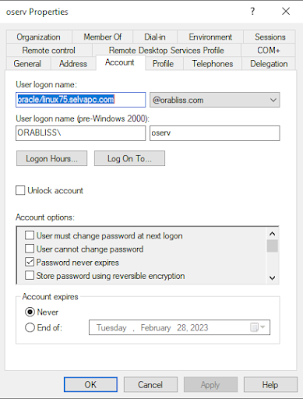
You can now notice in the above command, I'm still using the -mapuser as oserv@orabliss.com which is our SPN. Now the account will look like below.


Notice the User logon name has changed from ORACLE/linux-8.selvapc.com to oracle/linux75.selvapc.com 

Note: Please see the reason for small case usage for "oracle" in the troubleshooting post. 

Now, we are ready for testing. Transfer the keytab file generated to database server linux75.selvapc.com and create the externally authenticated user as usual. Once all is done, we are ready to connect to the database. 
SQL> create user cmuuser identified externally as 'snagulan@ORABLISS.COM';
grant create session to cmuuser;
grant select on v_$database to cmuuser;
User created.

SQL>
Grant succeeded.

SQL>

Grant succeeded.

SQL>
SQL> exit
Disconnected from Oracle Database 12c Enterprise Edition Release 12.2.0.1.0 - 64bit Production
[oracle@linux75 admin]$ okinit snagulan

Kerberos Utilities for Linux: Version 12.2.0.1.0 - Production on 29-JAN-2023 12:53:43

Copyright (c) 1996, 2016 Oracle.  All rights reserved.

Configuration file : /u01/db/122/network/admin/krb5.conf.
Password for snagulan@ORABLISS.COM:
[oracle@linux75 admin]$
[oracle@linux75 admin]$ oklist

Kerberos Utilities for Linux: Version 12.2.0.1.0 - Production on 29-JAN-2023 12:53:50

Copyright (c) 1996, 2016 Oracle.  All rights reserved.

Configuration file : /u01/db/122/network/admin/krb5.conf.
Ticket cache: FILE:/tmp/krb5cc_54321
Default principal: snagulan@ORABLISS.COM

Valid starting     Expires            Service principal
01/29/23 12:53:48  01/29/23 22:53:48  krbtgt/ORABLISS.COM@ORABLISS.COM
        renew until 01/30/23 12:53:44
[oracle@linux75 admin]$ sqlplus /@orclpdb

SQL*Plus: Release 12.2.0.1.0 Production on Sun Jan 29 12:53:58 2023

Copyright (c) 1982, 2016, Oracle.  All rights reserved.


Connected to:
Oracle Database 12c Enterprise Edition Release 12.2.0.1.0 - 64bit Production

SQL> set heading off
select 'DB_NAME (from v$database) : '||name,
       'CONTAINER_NAME            : '||sys_context('USERENV','CON_NAME'),
       'SESSION_USER              : '||sys_context('USERENV','SESSION_USER'),
       'AUTHENTICATED_IDENTITY    : '||sys_context('USERENV','AUTHENTICATED_IDENTITY'),
       'AUTHENTICATION_METHOD     : '||sys_context('USERENV','AUTHENTICATION_METHOD'),
SQL>        'IDENTIFICATION_TYPE       : '||sys_context('USERENV','IDENTIFICATION_TYPE'),
  2    3    4    5    6    7         --'LDAP_SERVER_TYPE          : '||sys_context('USERENV','LDAP_SERVER_TYPE'),
       'ENTERPRISE_IDENTITY       : '||sys_context('USERENV','ENTERPRISE_IDENTITY')
from v$database;  8    9

DB_NAME (from v$database) : ORCL
CONTAINER_NAME            : ORCLPDB
SESSION_USER              : CMUUSER
AUTHENTICATED_IDENTITY    : snagulan@ORABLISS.COM
AUTHENTICATION_METHOD     : KERBEROS
IDENTIFICATION_TYPE       : EXTERNAL
ENTERPRISE_IDENTITY       : snagulan@ORABLISS.COM


SQL> !hostname
linux75.selvapc.com

SQL>
 
Ok, we have successfully tested the kerberos connection from the newly configured database server. What happens to the previously configured database server since we have now change the SPN User Logon name? Does the CMU connection to the server linux-8.selvapc.com still work or does it break after new server configuration? 

Let's test it. 
[oracle@linux-8 ~]$ okinit snagulan

Kerberos Utilities for Linux: Version 19.0.0.0.0 - Production on 29-JAN-2023 23:31:46

Copyright (c) 1996, 2019 Oracle.  All rights reserved.

Configuration file : /oracle/db/db19/network/admin/krb5.conf.
Password for snagulan@ORABLISS.COM:
[oracle@linux-8 ~]$ oklist

Kerberos Utilities for Linux: Version 19.0.0.0.0 - Production on 29-JAN-2023 23:31:53

Copyright (c) 1996, 2019 Oracle.  All rights reserved.

Configuration file : /oracle/db/db19/network/admin/krb5.conf.
Ticket cache: FILE:/tmp/krb5cc_1000
Default principal: snagulan@ORABLISS.COM

Valid starting     Expires            Service principal
01/29/23 23:31:50  01/30/23 09:31:50  krbtgt/ORABLISS.COM@ORABLISS.COM
        renew until 01/30/23 23:31:47
[oracle@linux-8 ~]$ sqlplus /@odb1

SQL*Plus: Release 19.0.0.0.0 - Production on Sun Jan 29 23:32:12 2023
Version 19.10.0.0.0

Copyright (c) 1982, 2019, Oracle.  All rights reserved.

Last Successful login time: Sat Jan 28 2023 23:10:46 +05:30

Connected to:
Oracle Database 19c Enterprise Edition Release 19.0.0.0.0 - Production
Version 19.10.0.0.0

SQL> set heading off
select 'DB_NAME (from v$database) : '||name,
           'CONTAINER_NAME                        : '||sys_context('USERENV','CON_NAME'),
       'SESSION_USER              : '||sys_context('USERENV','SESSION_USER'),
       'AUTHENTICATED_IDENTITY    : '||sys_context('USERENV','AUTHENTICATED_IDENTITY'),
       'AUTHENTICATION_METHOD     : '||sys_context('USERENV','AUTHENTICATION_METHOD'),
       'IDENTIFICATION_TYPE       : '||sys_context('USERENV','IDENTIFICATION_TYPE'),
       'LDAP_SERVER_TYPE          : '||sys_context('USERENV','LDAP_SERVER_TYPE'),
       'ENTERPRISE_IDENTITY       : '||sys_context('USERENV','ENTERPRISE_IDENTITY')
from v$database;SQL>   2    3    4    5    6    7    8    9

DB_NAME (from v$database) : CDB19
CONTAINER_NAME                    : ODB1
SESSION_USER              : SELVA
AUTHENTICATED_IDENTITY    : snagulan@ORABLISS.COM
AUTHENTICATION_METHOD     : KERBEROS_GLOBAL
IDENTIFICATION_TYPE       : GLOBAL EXCLUSIVE
LDAP_SERVER_TYPE          : AD
ENTERPRISE_IDENTITY       : cn=Selvakumar Nagulan,cn=Users,dc=orabliss,dc=com


SQL>
SQL> !hostname
linux-8.selvapc.com

SQL>
 
We can see the CMU connection still works without any issues. This concludes we just need 1 SPN (in our case, oserv) to configure kerberos or CMU connection for multiple oracle database servers. 

Happy CMUing...!!!

Tuesday, November 22, 2022

Oracle Database and Anti Virus Softwares

 If you do a search for antivirus related issues in Oracle support, you will hit many notes talking about AVs causing issues with the Oracle database and this is not specific to any AV but in general to all the AV software. 

Taking a look at Oracle support note How To Configure Anti-Virus On Oracle Database Server (Doc ID 782354.1), Oracle mentions the below

we recommend the following files to be excluded from online anti-virus scanning.

  • Oracle datafiles
  • Control files
  • Redo-log files
  • Archived redo-log files if database is in archive log mode
  • Files with extension '.ora'
  • Password file
  • File in ADR directory
  • Oracle Software directories (including Oracle_HOME and Oracle base)
  • /dev/shm on Linux platform

So, is that it? Are we good if we just exclude all the files mentioned above? 

I'll discuss regarding the 2 scenarios which caused outages to the database w.r.to AV software (I'm not mentioning the names of the AV software here)

Scenario 1: 

We had installed one of the leading AV software on all our DB servers. During the testing phase everything goes smooth. Few files were asked to be excluded as suggested by Oracle and finally agreed to deploy them on production servers after rigorous testing in the lower environments. 

Soon after the production deployment, we started having issues with ASM disk writes as the ASM disks were invisible to Oracle. The following error pops up frequently on busy and high load databases. 

ORA-00202: control file: '+DATA/ABC/cntrlabc.dbf'~ORA-15081: failed to submit an I/O operation to a disk
ORA-00312: online log 5 thread 1: '+LOG/ABC/ONLINELOG/group_5.261.981173379'~ORA-15081: failed to submit an I/O operation to a disk
So what's really happening here? 

We are using udev rules to define the ASM disks on all our environments (old school but still works effectively). Our assumption is the AV software locks or prevents other processes from reading the udev rules files or the ASM disk header exactly during Oracle tries read/write udev rules file or the ASM disk header. The exact cause is not known till now as the incident is not reproducible at will.

To get out of this situation, we need to reload the udev rules and things will get back to normal. This is no joke as the busy database might lose data or the operations will get stalled when the control file/data file is missing from where it has to be. 
 
We worked with Oracle support who couldn't figure out anything specific from the logs provided and also we worked closely with the AV software vendor close to 8 months to trap the error/incident by trying different tracing and testing same workload during same previous issue time, etc., but as I mentioned we couldn't trap the issue and the tracing can't be directly enabled on the production database server for long times due to enormous logs the tracing produces, performance impact, etc. 

In the mean time, multiple version updates with minor to major file handling updates w.r.to Oracle database were introduced to the AV software but none of them help prevent the issue from occurring infrequently all of a sudden which made the business people unhappy.  
Finally, business agreed to move to another AV vendor 😜

The horror story continues... 

Scenario 2: 

During the 8 months time where all the R&D was happening with the previous vendor, there comes another AV software vendor with all the super cool features that one system can have to get rid of all the virus (just like the complete dose of COVID vaccine and on top of that a booster dose too). 
So just like the previous one, the testing went with flying colors. No outages like disk not visible, etc. was seen and no performance slowness reported in the lower environments and also a pilot was done on one of low risk production database server as well. 

Finally, it was decided to take the AV software to production along with other changes we usually do such as OS and DB patching every quarter. The deployment went fine for all the production DB servers with no issues reported during the maintenance window and post maintenance testing window. All are happy, all went to celebrate and sleep peacefully. 

Next day, business began as usual.. Time passed slowly.. Application team noticed slight delay in batch processing for one or other jobs.. They still were monitoring thinking it's an one off case and waited for sometime.. Performance is now getting a huge hit on one of the very critical OLTP database and the entire database was slowing down.. we had multiple tickets bombarding and eventually a high priority ticket was assigned and members from different groups (Application team, OS admins, Infra admins, DBAs) jumped on to the bridge to check from their end.

Initial checks with DB showed almost all the queries were running slow. This is not an ideal situation where all the queries would get hit. So the issue seems to be something out of database. Checks on OS shows that run queue for the CPU is too high and the time spent running the kernel is taking high percentage of the CPU. This is definitely unusual. 


You can see the load average is near 400 and this system is a 72 core system which translates to a load of ~ 5.5 which is too high. Interestingly, unlike all other days the kernel processing is taking > 50% (ideally should be < 10%) is a hint saying something messed up at the OS/kernel. 

So the first thing we did is to check for the AV activity and stop that right there as it's the only alien on the system. OS admin disabled the AV software. Still the CPU usage didn't come down. So we guessed it to be some other thing that's causing the issue. Remember we did OS and Database patching as well. So the plan now is to rollback both the patches one after another to figure out the cause. 

Meanwhile, support from vendors such as Oracle, Redhat and SAP (since the application is SAP) were also involved via high priority tickets to each of them. Oracle and SAP clearly mention that the cause might be from OS as the kernel processing is unusually high. So first we rolled back the kernel to previous version and rebooted the entire system. The issue was still persistent. Database patch was then rolled back and still the CPU usage didn't reduce to normal levels. 

We then installed perf tool which is not a standard package that comes along with Linux as Redhat needs some finer details to pin point the cause. Take a look here to learn much about perf
With the OS team providing the required details to Redhat support (I have limited knowledge on what traces were provided but guess perf stat trace), Redhat support got back to us with this module event_collector_2_3_xxx which is a third party module got loaded to the kernel and causing the kernel to suck up all the CPU. This module is from the AV software. We have to uninstall completely of the AV software and take a clean reboot to get rid of the module from kernel. 

One thing to understand is that though we disabled the AV software as first step of our troubleshooting, the same AV software was identified as culprit causing the slowness issue after very long investigation. This seriously would have been avoided if we know how the AV would behave if we just disable it.

So, what's the solution for this? 

Oracle doesn't certify any AV software to work properly with Oracle databases. We can't leave our production databases/servers unprotected. So we can't totally get rid of anti virus softwares at all. In the same time, we can't risk unexpected production downtime as we saw in the above 2 cases of the multiple other probabilities that might occur. 

What we can try is other alternatives than relying upon AVs such as below
  1. DB server should be restricted only for DB admin login, specifically only a senior DBA who does admin work (such as startup and shutdown using a sys account) and not the management work like adding/extending tablespaces kind of tasks. These other activities can be done remote using system or customized DBA account.  This makes sure very limited logins are available on the server directly unlike we have 1 common account (in most cases oracle) where all the members in team use to login. This poses a very serious security risk
  2. Place all DB servers under a subnet with tight firewalls such as auto log off in x seconds/minutes, trace entire activity and audit frequently on what commands been run, etc. Only SA and DBA should have direct login accounts. 
  3. OS login account should be coupled with AD and should use MFA to authenticate. The configuration seems complicated but this is one time configuration that needs the initial efforts to set up and we are done. 
  4. To limit direct access to DB, use kerberos/radius authentication or Centrally Managed Users (available from version 18c) which implements coupling enterprise users with AD accounts and groups which would allow users with their enterprise logins. Again this provides double protection as once the member leaves the organization, his/her account is totally wiped out making the server/DB secure 
  5. Use TCP.VALIDNODE_CHECKING = YES , TCP.EXCLUDED_NODES, TCP.INVITED_NODES sqlnet parameters to accept connections only from specific ip address or subnet making the application access to database super strong. 
These are the few things I can think of to secure the database/server from exploitation which would eliminate or minimize the requirement for an anti virus software. 

Let me know in comments of various other implementations that you come across to secure the database/servers in your organization so that we can help each other learn and secure our databases. 

References:

How To Configure Anti-Virus On Oracle Database Server (Doc ID 782354.1)What is TCP_VALIDNODE_CHECKING and How to Use It (Doc ID 462933.1)

Happy Anti Virusing...!!!

Thursday, June 30, 2022

RMAN Merged incremental backups

 We are changing our backup solutions vendor in our company and the new vendor utilizes the RMAN merged incremental backup. So let's see what is this and what are the advantages of this RMAN capability. 

Merged Incremental creates a level 0 image copy backup of all of your database's datafiles in a disk location. All datafiles are backed up using the same tag name. Block Change Tracking can be used for the incremental level 1 backups for Fast Incremental Backups


Let's see a quick demo on how to perform a Merged Incremental backup
run {
allocate channel c1 device type disk format '/media/sf_Oracle/RMAN-training/%U';
recover copy of database with tag 'Demo_merged_l0';
backup incremental level 1 copies=1 for recover of copy with tag 'Demo_merged_l0' database;
}
This is the default strategy which OEM uses. Let's say we are scheduling backup every day at 12 pm, then the copy of datafiles will be 24 hrs behind. 

First day: Run 1
[oracle@linux-8 RMAN-training]$ rman target sys/oracle@odb1

Recovery Manager: Release 19.0.0.0.0 - Production on Thu Jun 30 01:10:09 2022
Version 19.10.0.0.0

Copyright (c) 1982, 2019, Oracle and/or its affiliates.  All rights reserved.

connected to target database: CDB19:ODB1 (DBID=223390358)

RMAN> run {
allocate channel c1 device type disk format '/media/sf_Oracle/RMAN-training/%U';
recover copy of database with tag 'Demo_merged_l0';
backup incremental level 1 copies=1 for recover of copy with tag 'Demo_merged_l0' database;
}2> 3> 4> 5>

using target database control file instead of recovery catalog
allocated channel: c1
channel c1: SID=414 device type=DISK

Starting recover at 30-JUN-22
no copy of datafile 16 found to recover
no copy of datafile 17 found to recover
no copy of datafile 18 found to recover
no copy of datafile 19 found to recover
Finished recover at 30-JUN-22

Starting backup at 30-JUN-22
no parent backup or copy of datafile 18 found
no parent backup or copy of datafile 16 found
no parent backup or copy of datafile 17 found
no parent backup or copy of datafile 19 found
channel c1: starting datafile copy
input datafile file number=00018 name=+DATA/ODB1/DATAFILE/undotbs1.273.1084998671
output file name=/media/sf_Oracle/RMAN-training/data_D-CDB19_I-3846007102_TS-UNDOTBS1_FNO-18_kr11ag49 tag=DEMO_MERGED_L0 RECID=95 STAMP=1108689035
channel c1: datafile copy complete, elapsed time: 00:00:03
channel c1: starting datafile copy
input datafile file number=00016 name=+DATA/ODB1/DATAFILE/system.272.1084998669
output file name=/media/sf_Oracle/RMAN-training/data_D-CDB19_I-3846007102_TS-SYSTEM_FNO-16_ks11ag4c tag=DEMO_MERGED_L0 RECID=96 STAMP=1108689038
channel c1: datafile copy complete, elapsed time: 00:00:03
channel c1: starting datafile copy
input datafile file number=00017 name=+DATA/ODB1/DATAFILE/sysaux.274.1084998671
output file name=/media/sf_Oracle/RMAN-training/data_D-CDB19_I-3846007102_TS-SYSAUX_FNO-17_kt11ag4f tag=DEMO_MERGED_L0 RECID=97 STAMP=1108689040
channel c1: datafile copy complete, elapsed time: 00:00:01
channel c1: starting datafile copy
input datafile file number=00019 name=+DATA/CDB19/CD7591F2458BB5B4E053B538A8C08E48/DATAFILE/users.275.1108164853
output file name=/media/sf_Oracle/RMAN-training/data_D-CDB19_I-3846007102_TS-USERS_FNO-19_ku11ag4g tag=DEMO_MERGED_L0 RECID=98 STAMP=1108689040
channel c1: datafile copy complete, elapsed time: 00:00:01
Finished backup at 30-JUN-22
released channel: c1

RMAN> exit


Recovery Manager complete.
[oracle@linux-8 RMAN-training]$ ls -lrt
...
-rwxrwx---. 1 root vboxsf 1447043072 Jun 30 01:10 data_D-CDB19_I-3846007102_TS-UNDOTBS1_FNO-18_kr11ag49
-rwxrwx---. 1 root vboxsf 1258299392 Jun 30 01:10 data_D-CDB19_I-3846007102_TS-SYSTEM_FNO-16_ks11ag4c
-rwxrwx---. 1 root vboxsf  650125312 Jun 30 01:10 data_D-CDB19_I-3846007102_TS-SYSAUX_FNO-17_kt11ag4f
-rwxrwx---. 1 root vboxsf   41951232 Jun 30 01:10 data_D-CDB19_I-3846007102_TS-USERS_FNO-19_ku11ag4g
 
We can see we get "no copy of database # found to recover" as this is the first run and we don't have any copy made before to recover. 
Also the backup command throws "no parent backup or copy of datafile # found" since we are triggering a incremental level 1 backup without a prior level 0 backup. In this case, Oracle will create a fresh level 0 copy of the datafiles. This can be identified using "channel c1: starting datafile copy" without the mention of incremental level 1 which we will see in the next run. 

Second day: Run 2

RMAN> run {
allocate channel c1 device type disk format '/media/sf_Oracle/RMAN-training/%U';
recover copy of database with tag 'Demo_merged_l0';
backup incremental level 1 copies=1 for recover of copy with tag 'Demo_merged_l0' database;
}2> 3> 4> 5>

allocated channel: c1
channel c1: SID=414 device type=DISK

Starting recover at 30-JUN-22
no copy of datafile 16 found to recover
no copy of datafile 17 found to recover
no copy of datafile 18 found to recover
no copy of datafile 19 found to recover
Finished recover at 30-JUN-22

Starting backup at 30-JUN-22
channel c1: starting compressed incremental level 1 datafile backup set
channel c1: specifying datafile(s) in backup set
input datafile file number=00018 name=+DATA/ODB1/DATAFILE/undotbs1.273.1084998671
input datafile file number=00016 name=+DATA/ODB1/DATAFILE/system.272.1084998669
input datafile file number=00017 name=+DATA/ODB1/DATAFILE/sysaux.274.1084998671
input datafile file number=00019 name=+DATA/CDB19/CD7591F2458BB5B4E053B538A8C08E48/DATAFILE/users.275.1108164853
channel c1: starting piece 1 at 30-JUN-22
channel c1: finished piece 1 at 30-JUN-22
piece handle=/media/sf_Oracle/RMAN-training/kv11agra_671_1_1 tag=DEMO_MERGED_L0 comment=NONE
channel c1: backup set complete, elapsed time: 00:00:03
Finished backup at 30-JUN-22
released channel: c1

RMAN> exit
[oracle@linux-8 RMAN-training]$ ls -lrt
...
-rwxrwx---. 1 root vboxsf 1447043072 Jun 30 01:10 data_D-CDB19_I-3846007102_TS-UNDOTBS1_FNO-18_kr11ag49
-rwxrwx---. 1 root vboxsf 1258299392 Jun 30 01:10 data_D-CDB19_I-3846007102_TS-SYSTEM_FNO-16_ks11ag4c
-rwxrwx---. 1 root vboxsf  650125312 Jun 30 01:10 data_D-CDB19_I-3846007102_TS-SYSAUX_FNO-17_kt11ag4f
-rwxrwx---. 1 root vboxsf   41951232 Jun 30 01:10 data_D-CDB19_I-3846007102_TS-USERS_FNO-19_ku11ag4g
-rwxrwx---. 1 root vboxsf    2482176 Jun 30 01:22 kv11agra_671_1_1

We can still see "no copy of database # found to recover" as we don't have a previous level 1 backup. Remember the run 1 created a level 0 backup. Now, second created a incremental level 1 backup which you can see from "starting compressed incremental level 1 datafile backup set" line and also from the files list kv11agra_671_1_1

Third day: Run 3 and above
RMAN> run {
allocate channel c1 device type disk format '/media/sf_Oracle/RMAN-training/%U';
recover copy of database with tag 'Demo_merged_l0';
backup incremental level 1 copies=1 for recover of copy with tag 'Demo_merged_l0' database;
}2> 3> 4> 5>

using target database control file instead of recovery catalog
allocated channel: c1
channel c1: SID=414 device type=DISK

Starting recover at 30-JUN-22
channel c1: starting incremental datafile backup set restore
channel c1: specifying datafile copies to recover
recovering datafile copy file number=00016 name=/media/sf_Oracle/RMAN-training/data_D-CDB19_I-3846007102_TS-SYSTEM_FNO-16_ks11ag4c
recovering datafile copy file number=00017 name=/media/sf_Oracle/RMAN-training/data_D-CDB19_I-3846007102_TS-SYSAUX_FNO-17_kt11ag4f
recovering datafile copy file number=00018 name=/media/sf_Oracle/RMAN-training/data_D-CDB19_I-3846007102_TS-UNDOTBS1_FNO-18_kr11ag49
recovering datafile copy file number=00019 name=/media/sf_Oracle/RMAN-training/data_D-CDB19_I-3846007102_TS-USERS_FNO-19_ku11ag4g
channel c1: reading from backup piece /media/sf_Oracle/RMAN-training/kv11agra_671_1_1
channel c1: piece handle=/media/sf_Oracle/RMAN-training/kv11agra_671_1_1 tag=DEMO_MERGED_L0
channel c1: restored backup piece 1
channel c1: restore complete, elapsed time: 00:00:01
Finished recover at 30-JUN-22

Starting backup at 30-JUN-22
channel c1: starting compressed incremental level 1 datafile backup set
channel c1: specifying datafile(s) in backup set
input datafile file number=00018 name=+DATA/ODB1/DATAFILE/undotbs1.273.1084998671
input datafile file number=00016 name=+DATA/ODB1/DATAFILE/system.272.1084998669
input datafile file number=00017 name=+DATA/ODB1/DATAFILE/sysaux.274.1084998671
input datafile file number=00019 name=+DATA/CDB19/CD7591F2458BB5B4E053B538A8C08E48/DATAFILE/users.275.1108164853
channel c1: starting piece 1 at 30-JUN-22
channel c1: finished piece 1 at 30-JUN-22
piece handle=/media/sf_Oracle/RMAN-training/l011ahbn_672_1_1 tag=DEMO_MERGED_L0 comment=NONE
channel c1: backup set complete, elapsed time: 00:00:03
Finished backup at 30-JUN-22
released channel: c1

RMAN> exit
[oracle@linux-8 RMAN-training]$ ls -lrt
...
-rwxrwx---. 1 root vboxsf    2482176 Jun 30 01:22 kv11agra_671_1_1
-rwxrwx---. 1 root vboxsf   41951232 Jun 30 01:31 data_D-CDB19_I-3846007102_TS-USERS_FNO-19_ku11ag4g
-rwxrwx---. 1 root vboxsf  650125312 Jun 30 01:31 data_D-CDB19_I-3846007102_TS-SYSAUX_FNO-17_kt11ag4f
-rwxrwx---. 1 root vboxsf 1447043072 Jun 30 01:31 data_D-CDB19_I-3846007102_TS-UNDOTBS1_FNO-18_kr11ag49
-rwxrwx---. 1 root vboxsf 1258299392 Jun 30 01:31 data_D-CDB19_I-3846007102_TS-SYSTEM_FNO-16_ks11ag4c
-rwxrwx---. 1 root vboxsf    2580480 Jun 30 01:31 l011ahbn_672_1_1

Now we can see the previous level 1 backup has been applied on the datafile copies and also an incr level 1 copy has been taken. 
You can see the copy is been recovered the next day and hence the copy will always be 24 hrs behind.

We can change the strategy to make the copies current by flipping the backup and recover commands like below. 
run {
allocate channel c1 device type disk format '/media/sf_Oracle/RMAN-training/%U';
backup incremental level 1 copies=1 for recover of copy with tag 'Demo_merged_l0' database;
recover copy of database with tag 'Demo_merged_l0';
}
Coming to retention...

The above strategy will work for us if we need to restore the backup on the same day or from the period the datafile copy is made. Now, if we need to have a retention for a longer period say 30 days, then we can lag the recover by 30 days by using the below command
RECOVER COPY OF DATABASE WITH TAG 'Demo_merged_l0' UNTIL TIME "SYSDATE-31" FROM TAG 'Demo_merged_l0';
Block change tracking can also be used to take the incremental backups. In order to track 30 days of incr level 1, the hidden parameter _bct_bitmaps_per_file should be increased from its default value of 8 (8 days) to 30. 

Advantages: 

For VLDBs, this solution will provide quicker backups as only the 1st day we will take the full backup and then it will be continuous ever incremental backup only.

References: 

Happy Backups...!!!