Showing posts with label Oracle CMU. Show all posts

Monday, January 30, 2023

Oracle CMU - Service Principal Name with multiple servers

 I have written regarding setting up Oracle Centrally Managed Users (CMU) and the various troubleshooting steps in my previous posts. You can take a look at those by clicking below links.

Once we complete the setup, one of the most anticipated questions one will have is how many Service Principal Accounts (oserv - in our lab) do we need to create if we have databases on multiple servers. For example, if we have 10 servers, do we need 1 Service Principal Account (SPN) or 10 SPNs individual to each server. 

I have raised this question to Oracle support on multiple SRs and the answers differ from each SR. One engineer says all we need is 1 SPN and another engineer says we need 10 SPNs if we have 10 servers. This is confusing. So, now we will test it ourselves. I'll be configuring Kerberos Authentication on another server (linux75.selvapc.com) running Oracle database 12.2.0.1 

For this test, we are not going to change any of the steps from the PART A and PART B of the CMU configuration since that will complete the Kerberos authentication. My sqlnet.ora and krb5.conf will not have any changes from the other server. 

[oracle@linux75 admin]$ more sqlnet.ora
# sqlnet.ora Network Configuration File: /u01/db/122/network/admin/sqlnet.ora
# Generated by Oracle configuration tools.

NAMES.DIRECTORY_PATH= (TNSNAMES, EZCONNECT)
#Kerberos Parameters
SQLNET.AUTHENTICATION_SERVICES=(beq,kerberos5)
SQLNET.FALLBACK_AUTHENTICATION=TRUE
SQLNET.AUTHENTICATION_KERBEROS5_SERVICE=oracle
SQLNET.KERBEROS5_CONF=/u01/db/122/network/admin/krb5.conf
SQLNET.KERBEROS5_CLOCKSKEW=6000
SQLNET.KERBEROS5_CONF_MIT=TRUE
#Following parameter is server-side only
SQLNET.KERBEROS5_KEYTAB=/u01/db/122/network/admin/linux75-database.keytab
[oracle@linux75 admin]$
[oracle@linux75 admin]$ more krb5.conf
[libdefaults]
    default_realm = ORABLISS.COM
    clockskew = 6000
    passwd_check_s_address = false
    noaddresses = true
    forwardable = yes
[realms]
    ORABLISS.COM = {
        kdc = 192.168.56.99:88
    }
[domain_realm]
    ORABLISS.COM = ORABLISS.COM
    .ORABLISS.COM = ORABLISS.COM
    orabliss.com = ORABLISS.COM
    .orabliss.com = ORABLISS.COM
[oracle@linux75 admin]$
You can notice, the only difference will be the keytab file specific to my linux75 server. 

The keytab file is generated as below 
Windows PowerShell
Copyright (C) Microsoft Corporation. All rights reserved.

PS C:\Users\Administrator> ktpass -princ oracle/linux75.selvapc.com@ORABLISS.com -pass Qwerty123# -mapuser oserv@orabliss.com -crypto ALL -ptype KRB5_NT_PRINCIPAL -out Z:\linux75-database.keytab
Targeting domain controller: DS2019.orabliss.com
Successfully mapped oracle/linux75.selvapc.com to oserv.
Password successfully set!
Key created.
Key created.
Key created.
Key created.
Key created.
Output keytab to Z:\linux75-database.keytab:
Keytab version: 0x502
keysize 66 oracle/linux75.selvapc.com@ORABLISS.com ptype 1 (KRB5_NT_PRINCIPAL) vno 11 etype 0x1 (DES-CBC-CRC) keylength 8 (0xfb5e5b384c467904)
keysize 66 oracle/linux75.selvapc.com@ORABLISS.com ptype 1 (KRB5_NT_PRINCIPAL) vno 11 etype 0x3 (DES-CBC-MD5) keylength 8 (0xfb5e5b384c467904)
keysize 74 oracle/linux75.selvapc.com@ORABLISS.com ptype 1 (KRB5_NT_PRINCIPAL) vno 11 etype 0x17 (RC4-HMAC) keylength 16 (0xc5c6bc2b1d924244af78c13df85a5eee)
keysize 90 oracle/linux75.selvapc.com@ORABLISS.com ptype 1 (KRB5_NT_PRINCIPAL) vno 11 etype 0x12 (AES256-SHA1) keylength 32 (0xc9e1bf8b841bd336c3ab4fca0c67f0037b21d5719b4c661606a0745cd823e7f7)
keysize 74 oracle/linux75.selvapc.com@ORABLISS.com ptype 1 (KRB5_NT_PRINCIPAL) vno 11 etype 0x11 (AES128-SHA1) keylength 16 (0x4e84b8fae0598b793cd76a09f5658f29)
PS C:\Users\Administrator>
You can now notice in the above command, I'm still using the -mapuser as oserv@orabliss.com which is our SPN. Now the account will look like below.
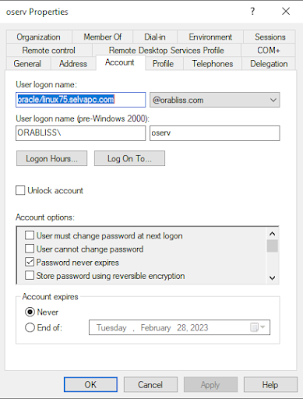


Notice the User logon name has changed from ORACLE/linux-8.selvapc.com to oracle/linux75.selvapc.com 

Note: Please see the reason for small case usage for "oracle" in the troubleshooting post. 

Now, we are ready for testing. Transfer the keytab file generated to database server linux75.selvapc.com and create the externally authenticated user as usual. Once all is done, we are ready to connect to the database. 
SQL> create user cmuuser identified externally as 'snagulan@ORABLISS.COM';
grant create session to cmuuser;
grant select on v_$database to cmuuser;
User created.

SQL>
Grant succeeded.

SQL>

Grant succeeded.

SQL>
SQL> exit
Disconnected from Oracle Database 12c Enterprise Edition Release 12.2.0.1.0 - 64bit Production
[oracle@linux75 admin]$ okinit snagulan

Kerberos Utilities for Linux: Version 12.2.0.1.0 - Production on 29-JAN-2023 12:53:43

Copyright (c) 1996, 2016 Oracle.  All rights reserved.

Configuration file : /u01/db/122/network/admin/krb5.conf.
Password for snagulan@ORABLISS.COM:
[oracle@linux75 admin]$
[oracle@linux75 admin]$ oklist

Kerberos Utilities for Linux: Version 12.2.0.1.0 - Production on 29-JAN-2023 12:53:50

Copyright (c) 1996, 2016 Oracle.  All rights reserved.

Configuration file : /u01/db/122/network/admin/krb5.conf.
Ticket cache: FILE:/tmp/krb5cc_54321
Default principal: snagulan@ORABLISS.COM

Valid starting     Expires            Service principal
01/29/23 12:53:48  01/29/23 22:53:48  krbtgt/ORABLISS.COM@ORABLISS.COM
        renew until 01/30/23 12:53:44
[oracle@linux75 admin]$ sqlplus /@orclpdb

SQL*Plus: Release 12.2.0.1.0 Production on Sun Jan 29 12:53:58 2023

Copyright (c) 1982, 2016, Oracle.  All rights reserved.


Connected to:
Oracle Database 12c Enterprise Edition Release 12.2.0.1.0 - 64bit Production

SQL> set heading off
select 'DB_NAME (from v$database) : '||name,
       'CONTAINER_NAME            : '||sys_context('USERENV','CON_NAME'),
       'SESSION_USER              : '||sys_context('USERENV','SESSION_USER'),
       'AUTHENTICATED_IDENTITY    : '||sys_context('USERENV','AUTHENTICATED_IDENTITY'),
       'AUTHENTICATION_METHOD     : '||sys_context('USERENV','AUTHENTICATION_METHOD'),
SQL>        'IDENTIFICATION_TYPE       : '||sys_context('USERENV','IDENTIFICATION_TYPE'),
  2    3    4    5    6    7         --'LDAP_SERVER_TYPE          : '||sys_context('USERENV','LDAP_SERVER_TYPE'),
       'ENTERPRISE_IDENTITY       : '||sys_context('USERENV','ENTERPRISE_IDENTITY')
from v$database;  8    9

DB_NAME (from v$database) : ORCL
CONTAINER_NAME            : ORCLPDB
SESSION_USER              : CMUUSER
AUTHENTICATED_IDENTITY    : snagulan@ORABLISS.COM
AUTHENTICATION_METHOD     : KERBEROS
IDENTIFICATION_TYPE       : EXTERNAL
ENTERPRISE_IDENTITY       : snagulan@ORABLISS.COM


SQL> !hostname
linux75.selvapc.com

SQL>
 
Ok, we have successfully tested the kerberos connection from the newly configured database server. What happens to the previously configured database server since we have now change the SPN User Logon name? Does the CMU connection to the server linux-8.selvapc.com still work or does it break after new server configuration? 

Let's test it. 
[oracle@linux-8 ~]$ okinit snagulan

Kerberos Utilities for Linux: Version 19.0.0.0.0 - Production on 29-JAN-2023 23:31:46

Copyright (c) 1996, 2019 Oracle.  All rights reserved.

Configuration file : /oracle/db/db19/network/admin/krb5.conf.
Password for snagulan@ORABLISS.COM:
[oracle@linux-8 ~]$ oklist

Kerberos Utilities for Linux: Version 19.0.0.0.0 - Production on 29-JAN-2023 23:31:53

Copyright (c) 1996, 2019 Oracle.  All rights reserved.

Configuration file : /oracle/db/db19/network/admin/krb5.conf.
Ticket cache: FILE:/tmp/krb5cc_1000
Default principal: snagulan@ORABLISS.COM

Valid starting     Expires            Service principal
01/29/23 23:31:50  01/30/23 09:31:50  krbtgt/ORABLISS.COM@ORABLISS.COM
        renew until 01/30/23 23:31:47
[oracle@linux-8 ~]$ sqlplus /@odb1

SQL*Plus: Release 19.0.0.0.0 - Production on Sun Jan 29 23:32:12 2023
Version 19.10.0.0.0

Copyright (c) 1982, 2019, Oracle.  All rights reserved.

Last Successful login time: Sat Jan 28 2023 23:10:46 +05:30

Connected to:
Oracle Database 19c Enterprise Edition Release 19.0.0.0.0 - Production
Version 19.10.0.0.0

SQL> set heading off
select 'DB_NAME (from v$database) : '||name,
           'CONTAINER_NAME                        : '||sys_context('USERENV','CON_NAME'),
       'SESSION_USER              : '||sys_context('USERENV','SESSION_USER'),
       'AUTHENTICATED_IDENTITY    : '||sys_context('USERENV','AUTHENTICATED_IDENTITY'),
       'AUTHENTICATION_METHOD     : '||sys_context('USERENV','AUTHENTICATION_METHOD'),
       'IDENTIFICATION_TYPE       : '||sys_context('USERENV','IDENTIFICATION_TYPE'),
       'LDAP_SERVER_TYPE          : '||sys_context('USERENV','LDAP_SERVER_TYPE'),
       'ENTERPRISE_IDENTITY       : '||sys_context('USERENV','ENTERPRISE_IDENTITY')
from v$database;SQL>   2    3    4    5    6    7    8    9

DB_NAME (from v$database) : CDB19
CONTAINER_NAME                    : ODB1
SESSION_USER              : SELVA
AUTHENTICATED_IDENTITY    : snagulan@ORABLISS.COM
AUTHENTICATION_METHOD     : KERBEROS_GLOBAL
IDENTIFICATION_TYPE       : GLOBAL EXCLUSIVE
LDAP_SERVER_TYPE          : AD
ENTERPRISE_IDENTITY       : cn=Selvakumar Nagulan,cn=Users,dc=orabliss,dc=com


SQL>
SQL> !hostname
linux-8.selvapc.com

SQL>
 
We can see the CMU connection still works without any issues. This concludes we just need 1 SPN (in our case, oserv) to configure kerberos or CMU connection for multiple oracle database servers. 

Happy CMUing...!!!

Thursday, December 29, 2022

Troubleshooting Kerberos and Oracle CMU configuration

 In one of my previous posts, I have shared complete steps to configure Oracle Centrally Managed Users (CMU) which was completely done in my personal lab environment. Though I have encountered few hiccups, I was able to set it up without big issues. 

Now I'm trying to perform a proof of concept of the same set up in my work environment where I was stuck with several different issues and crossing them one after the other. As I was working with Oracle support and trying to iron out all issues, I learnt a few things related to AD, LDAP, etc.,.


In this post, I'll share the troubleshooting steps for the issues encountered so that it could help fellow DBAs to set up in their environment. 

The following support note will be of much help but its very limited in identifying the exact issue. We can use this note as starting point to dig deeper. 

Kerberos Troubleshooting Guide (Doc ID 185897.1)

Ok, let's start with the different troubleshooting steps. This is not step by step approach and any step can be used any time as per need basis

1. Tracing:

We might just get random errors like ORA-12638, ORA-12631, etc., but it lead you to nowhere. So need to trace the session in order to work with Oracle support and provide them with what they are looking for. So how do you trace the session? 

We need to set the below parameters in sqlnet.ora in both database server (if server trace is needed) and client machine (usually this will be mandatory to have). 

TRACE_UNIQUE_SERVER = ON
TRACE_LEVEL_SERVER = 16
TRACE_DIRECTORY_SERVER = /oracle/ABC/19.0.0/network/log
TRACE_FILE_SERVER = Server_Trace
TRACE_TIMESTAMP_SERVER = ON
DIAG_ADR_ENABLED=OFF
TRACE_UNIQUE_CLIENT = ON
TRACE_LEVEL_CLIENT = 16
TRACE_DIRECTORY_CLIENT = /oracle/ABC/19.0.0/network/log
TRACE_FILE_CLIENT = Client_Trace
TRACE_TIMESTAMP_CLIENT = ON
DIAG_ADR_ENABLED=OFF
Once tracing is completed, we can switch the parameter TRACE_LEVEL_SERVER or TRACE_LEVEL_CLIENT to OFF which will stop tracing of sessions. Make sure you just turn on and turn off quickly once you test your connection as this is instance wide and all the sessions will be traced filling up your log location/disk quickly. 

You can identify the trace file by looking into the sqlnet.log file, just giving a sample log content from the sqlnet.log
***********************************************************************
Fatal NI connect error 12631, connecting to:
 (DESCRIPTION=(ADDRESS=(PROTOCOL=TCP)(HOST=xxxxx.com)(PORT=1521))(CONNECT_DATA=(SERVER=DEDICATED)(SERVICE_NAME=ABC)(CID=(PROGRAM=sqlplus)(HOST=xxxxx)(USER=oracle))))

  VERSION INFORMATION:
        TNS for Linux: Version 19.0.0.0.0 - Production
        TCP/IP NT Protocol Adapter for Linux: Version 19.0.0.0.0 - Production
  Version 19.16.0.0.0
  Time: 23-DEC-2022 19:34:37
  Tracing to file: /oracle/ABC/19.0.0/network/log/client_trace_3655062.trc
  Tns error struct:
    ns main err code: 12631
    TNS-12631: Username retrieval failed
    ns secondary err code: 0
	
***********************************************************************
The logfile is indicated for the error that we have received. We can provide this log file to Oracle support for further review

2. Generating krb5 trace:

Below commands would help generate krb5 trace where we can trace actions related to okinit 

a) Set krb5_trace parameter

export KRB5_TRACE=<path>/krb5trace.trc
echo $KRB5_TRACE

b) On the database server run

$ okdstry
$ okinit <xxx>
$ oklist
$ sqlplus /@<connect_identifier>

This will generate krb5trace.trc file which can be uploaded to support for their analysis

3. Use of same case for principal name:

While creating SPN for database and generating keytab file, make sure you are using small case for creation and configuration 

I have used 
ktpass -princ ORACLE/linux-8.selvapc.com@ORABLISS.com -pass Qwerty123# -mapuser oserv@orabliss.com -crypto ALL -ptype KRB5_NT_PRINCIPAL -out Z:\linux-8-database.keytab

This resulted in error in my PoC environment. 

Instead use small case for database SPN
ktpass -princ oracle/linux-8.selvapc.com@ORABLISS.com -pass Qwerty123# -mapuser oserv@orabliss.com -crypto ALL -ptype KRB5_NT_PRINCIPAL -out Z:\linux-8-database.keytab  

sqlnet.ora should also have principal name in small case. 

SQLNET.AUTHENTICATION_KERBEROS5_SERVICE=oracle

4. ldapbind:

The ldapbind command-line tool enables you to see whether you can authenticate a client to a server. When we set up CMU and if we are getting error, we can check whether the client machine is getting authenticated with the server by using the command as below.

ldapbind -h <AD Host> -p 389 -D <value of ORACLE.SECURITY.DN> -w <value of ORACLE.SECURITY.PASSWORD>
ldapbind -h <AD Host> -p 389 -D <value of ORACLE.SECURITY.USERNAME> -w <value of ORACLE.SECURITY.PASSWORD>
ldapbind -h <AD Host> -p 636 -U 2 -W "file:<wallet location>" -P <wallet password> -D <value of ORACLE.SECURITY.DN> -w <value of ORACLE.SECURITY.PASSWORD>
ldapbind -h <AD Host> -p 636 -U 2 -W "file:<wallet location>" -P <wallet password> -D <value of ORACLE.SECURITY.USERNAME> -w <value of ORACLE.SECURITY.PASSWORD>

The first 2 test will test authentication with TCP and the next 2 will test authentication with SSL which we would have already set up in CMU. 

Example given below: 
$ ldapbind -h xxx.xxx.example.com -p 389 -D "CN=SV-oraservice,OU=Service,OU=Accounts,DC=xxx,DC=xxx,DC=example,DC=com" -w '%*9&nnh!!GFulh!G'
bind successful
$ ldapbind -h xxx.xxx.example.com -p 389 -D SV-oraservice -w '%*9&nnh!!GFulh!G'
bind successful
$ ldapbind -h xxx.xxx.example.com -p 636 -U 2 -W "file:/oracle/grid/19.0.0/network/admin/cmu_wallet" -P W9&nnhYT# -D "CN=SV-oraservice,OU=Service,OU=Accounts,DC=xxx,DC=xxx,DC=example,DC=com" -w '%*9&nnh!!GFulh!G'
bind successful
$ ldapbind -h xxx.xxx.example.com -p 636 -U 2 -W "file:/oracle/grid/19.0.0/network/admin/cmu_wallet" -P W9&nnhYT# -D SV-oraservice -w '%*9&nnh!!GFulh!G'
bind successful
$
If there is any issue with the connectivity, we will be getting a different error. For eg, let me try with a wrong password for the service account..
$ ldapbind -h xxx.xxx.example.com -p 389 -D "CN=SV-oraservice,OU=Service,OU=Accounts,DC=xxx,DC=xxx,DC=example,DC=com" -w 'wrongpass'
ldap_bind: Invalid credentials
ldap_bind: additional info: 80090308: LdapErr: DSID-0C090439, comment: AcceptSecurityContext error, data 52e, v4563
$
You can see when I provided a wrong password, I got the Invalid credentials error as expected. 

5. LDAP force sync

When there is change in the AD side such as password change for the service account, Oracle sometimes won't sync up with the changes and will throw error. We need to force sync Oracle with the LDAP services using the below parameters. 
Note: This is needed only when you doubt that Oracle is not synced up with AD/LDAP 
SQL> alter system set "_ldap_config_force_sync_up"=TRUE;

System altered.

SQL> alter system set "_ldap_config_force_sync_up"=FALSE;

System altered.

SQL> exit

$ sqlplus /@<connect string> 
 
We just need to set _ldap_config_force_sync_up TRUE and FALSE and retry the connection to the database. 

6. Viewing available certificates in AD server

Usually certificates are provided by issuing authority or if it's internal as in this case, AD team will provide you with the certificates. In my case, if I need to check what are the certificates I might need from AD team for the configuration to work, we can check using the openssl -showcert command. 

The command is as follows 
openssl s_client -connect <AD host>:636 -showcerts
$ orapki wallet display -wallet .
Oracle PKI Tool Release 19.0.0.0.0 - Production
Version 19.4.0.0.0
Copyright (c) 2004, 2021, Oracle and/or its affiliates. All rights reserved.

Requested Certificates:
User Certificates:
Oracle Secret Store entries:
ORACLE.SECURITY.DN
ORACLE.SECURITY.PASSWORD
ORACLE.SECURITY.USERNAME
Trusted Certificates:
Subject: CN=EXAMPLE MSPKI XXX Root CA
$
$ openssl s_client -connect abcdef12.xxx.xxx.example.com:636 -showcerts
CONNECTED(00000003)
depth=1 DC = com, DC = example, DC = xxx, DC = xxx, CN = qasmime95
verify error:num=20:unable to get local issuer certificate
verify return:1
depth=0 CN = ABCDEF12.xxx.xxx.example.com
verify return:1
---
Certificate chain
 0 s:CN = ABCDEF12.xxx.xxx.example.com
   i:DC = com, DC = example, DC = xxx, DC = xxx, CN = qasmime95
-----BEGIN CERTIFICATE-----
MIIFuDCCBKCgAwIBAgITbwAABIUbCx91qS38VQAAAAAEhTANBgkqhkiG9w0BAQsF
ADB2MRMwEQYKCZImiZPyLGQBGRYDY29tMRkwFwYKCZImiZPyLGQBGRYJaG9uZXl3
...
...
...
ZA8ptBPzUXSgSNI+5wfh3F58Tfoi8Ig07ryyR4HD3WKGDE2DDSmMdnZ8oB2cBnuJ
T1RQK8+16GKI1bQFoNRfbwZZXmOjlIJiESZvUg==
-----END CERTIFICATE-----
 1 s:DC = com, DC = example, DC = xxx, DC = xxx, CN = qasmime95
   i:CN = EXAMPLE QMSPKI XXX Root CA
-----BEGIN CERTIFICATE-----
MIIGJDCCBAygAwIBAgITfQAAAAvG9D//4L986AAAAAAACzANBgkqhkiG9w0BAQsF
ADAsMSowKAYDVQQDEyFIb25leXdlbGwgUU1TUEtJIEludGVybmFsIFJvb3QgQ0Ew
...
...
...
ZNaJmBGIBZsLM6IrUw/WGAdNdPQUbcXMBdlSGY5DaGYMGNjnoOqPHQ==
-----END CERTIFICATE-----
---
Server certificate
subject=CN = ABCDEF12.xxx.xxx.example.com

issuer=DC = com, DC = example, DC = xxx, DC = xxx, CN = qasmime95
...
...
 
$
This check is required if you suspect that the provider team has given a prod certificate in place of non prod certificate or vice versa. You can see from above that the wallet has MSPKI XXX Root CA whereas the AD server has QMSPKI XXX Root CA. So we have an incorrect certificate in the wallet and hence it needs to be removed and proper certificate needs to be imported. 
Note: O/p of the command has been trimmed to include only needed content. 

7. Check your account availability

I know this can be an odd situation as to check our account availability but its better to check whether the account that you are trying to access is created/available in the AD and is binded to the service account. We can use ldapsearch command to check for the account existence with all the account details 

Command is as below 
ldapsearch -R -h <AD host> -p 389 -b "DC=xxxx,DC=xx,DC=com" -D <ad super user> -w "<ad user password>" "sAMAccountName=<AD user>"
$ ldapsearch -R -h abcdef12.xxxxx.xx.example.com -p 389 -b "DC=xxxxx,DC=xx,DC=example,DC=com" -D SV-oraservice -w 'password' "sAMAccountName=h368225"
CN=Selvakumar Nagulan,OU=Accounts,OU=Tier1,OU=Admin,DC=xxxxx,DC=xx,DC=example,DC=com
objectClass=top
objectClass=person
objectClass=organizationalPerson
objectClass=user
cn=Selvakumar Nagulan
...
...
 
$
Note that we use our service account as super user to check whether our DB user is properly bind to super user or not. You will get a blank response if the user is not bind or not configured. 


So that's all for now as I was able to successfully configure CMU after working with Oracle support with 2 different support tickets and internal AD team spanning over a month. You might connect with me on any issues regarding setting up CMU in your organization and I would be happy to help with my experiences troubleshooting the same. 

References: 

Oracle Centrally Managed Users (CMU) configuration

Happy Troubleshooting!!! 


Tuesday, August 23, 2022

Oracle Centrally Managed Users (CMU) configuration

Centrally managed users (CMU) provides a simpler integration with Microsoft Active Directory to allow centralized authentication and authorization of users. 

Quote from official documentation
"In order for the Oracle Database CMU with Active Directory integration to work, the Oracle database must be able to login to a service account specifically created for the database in Active Directory. The database uses this service account to query Active Directory for user and group information when a user logs into the database. This Active Directory service account must have all the privileges required to query the user and group information as well as being able to write updates related to the password policies in Active Directory (for example, failed login attempts, clear failed login attempts). Users can authenticate using passwords, Kerberos, or PKI and either be assigned to an exclusive schema or a shared schema. Mapping of an Active Directory user to a shared schema is determined by the association of the user to an Active Directory group that is mapped to the shared schema. Active Directory groups can also be mapped to database global roles. An Active Directory security administrator can assign a user to groups that are mapped to shared database global users (schemas) and/or database global roles, and hence update privileges and roles that are assigned to the Active Directory user in a database."

In this post, I'll be explaining how to configure Oracle Centrally Managed Users using Windows server 2019 Active Directory and Oracle database version 19c. 


Since the configuration is a bit long with multiple screen shots I have made, I have divided the steps into 4 major parts which are as below

  • Part A: AD Configuration
  • Part B: Database Server Configuration
  • Part C: Enhancing to CMU
  • Part D: Enhancing CMU with Shared users and roles

All the steps are explained in the downloadable document. Click below link to download the file.

>>> Centrally Managed Users - orabliss.com <<<

Please make use of the document and share the feedback or any clarification if you have, I'll try to help solve them. 

I had to set up my own AD on virtual box for which I have not covered the steps in the document but the first 2 reference links will help you set up one if you need to.. 

References: 


Happy CMing Users!!! :)